

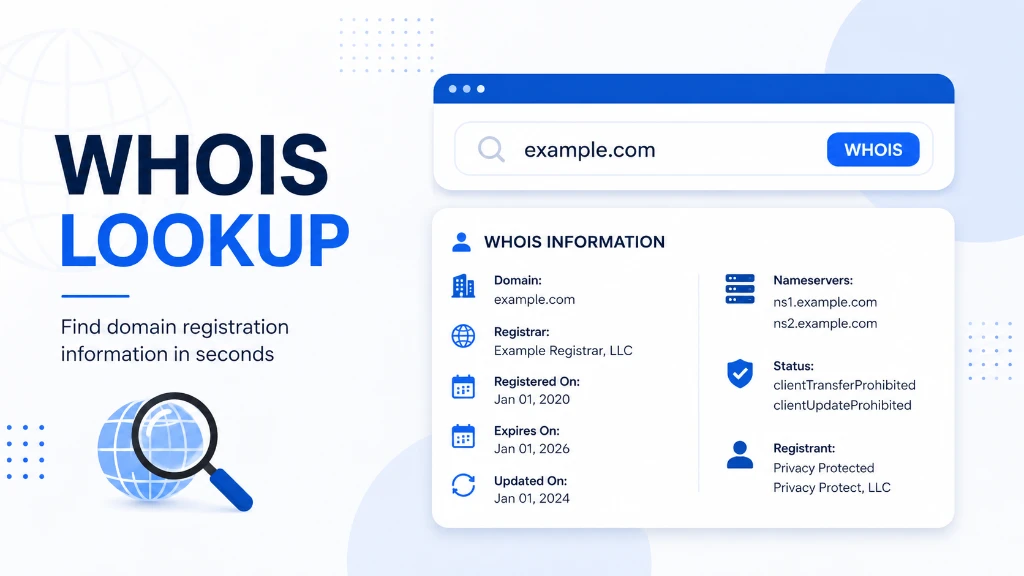
If you have ever wondered who registered a domain name, which company manages it, when it was created, or when it expires, a WHOIS lookup can help you find the available registration information.
WHOIS has been used for decades to access information associated with domain names and Internet resources. Today, however, the landscape has changed because RDAP is the modern replacement for the traditional WHOIS protocol for generic top-level domains (gTLDs).
In this guide, you will learn what a WHOIS lookup is, what information you can find, how to perform one, why it is useful, and why some registration details may be hidden.
What Is WHOIS Lookup?
A WHOIS lookup is a search that retrieves publicly available registration information associated with a domain name or Internet number resource. Depending on the domain and available data, the results can include the registrar, registration dates, domain status, nameservers, and some registrant information.
The word "WHOIS" is not actually an acronym. ICANN describes WHOIS as a service and related set of protocols and data used to answer questions about who is responsible for a domain name or IP address.
For example, if you perform a lookup for:
example.com
you may see information such as:
- Domain name
- Registrar
- Registration status
- Creation date
- Expiration date
- Last updated date
- Nameservers
- DNS-related information
- Registrant information, when publicly available
The exact information depends on the domain extension, registrar, registry, privacy protections, and current registration-data policies.
What Information Does a WHOIS Lookup Show?
A domain registration lookup can provide several useful pieces of information.
| Information | What it tells you |
|---|---|
| Domain name | The domain being queried |
| Registrar | Company responsible for the domain registration |
| Creation date | When the domain was originally registered |
| Expiration date | When the current registration period ends |
| Updated date | When registration information was last changed |
| Domain status | Current registration or transfer-related status |
| Nameservers | Servers associated with the domain's DNS |
| Registrant data | Available information about the registered name holder |
| Registry information | Details associated with the domain's registry |
Not every lookup will display every field. Privacy and data-protection policies can limit publicly available personal information.
ICANN notes that some WHOIS results may show the actual registrant's information, while others may display privacy or proxy-protected information instead.
What Is a Domain Registrar?
A domain registrar is a company through which a domain name is registered and managed.
For example, if you purchase a domain through a registrar, that registrar handles the registration relationship and provides tools for managing the domain.
A WHOIS or registration-data lookup can therefore help you identify which registrar is associated with a domain.
This can be useful when troubleshooting ownership questions, transferring a domain, or determining where a domain is currently managed.
How Does a WHOIS Lookup Work?
Traditional WHOIS uses a query-and-response model. The original WHOIS protocol is documented in RFC 3912 and traditionally operates over TCP port 43.
The basic process looks like this:
1. You enter a domain name into a lookup tool.
2. The tool sends a registration-data query.
3. The appropriate registry or registrar provides available information.
4. The tool organizes the response into information you can read.
5. You review details such as registrar, dates, status, and nameservers.
However, there is an important modern distinction.
WHOIS vs. RDAP
WHOIS is still a common term people use when searching for domain registration information, but RDAP has become the modern standardized replacement for WHOIS for gTLD registration data.
ICANN states that, beginning January 28, 2025, RDAP became the definitive source for gTLD registration information in place of sunsetted WHOIS services, with limited exceptions.
RDAP provides several improvements over the older WHOIS protocol, including:
- More standardized responses
- Better internationalization support
- Authoritative server discovery
- More secure access
- Support for differentiated access to registration data
So when people search for a WHOIS lookup tool today, they may actually be using an RDAP-powered service behind the scenes.
WHOIS Lookup vs. RDAP Lookup
| Feature | Traditional WHOIS | RDAP |
|---|---|---|
| Purpose | Registration data lookup | Registration data lookup |
| Data format | Mostly text-based | Structured response |
| Internationalization | Limited | Better support |
| Server discovery | Limited | Supported |
| Modern standard | Older protocol | Modern replacement |
| gTLD role | Being phased out | Definitive source for gTLD data |
The practical takeaway is simple: you do not need to understand the technical difference to perform a domain lookup. A modern lookup tool can present the relevant registration information in an easy-to-read format.
Why Should You Use a WHOIS Lookup?
A WHOIS lookup is useful for much more than curiosity. Website owners, developers, security researchers, marketers, and businesses can use registration information for legitimate research and troubleshooting.
1. Check When a Domain Was Registered
The creation date can tell you when a domain registration began.
This can be useful when researching a website, investigating an unfamiliar domain, or evaluating the history of a domain before acquiring it.
Keep in mind that the creation date does not automatically prove how trustworthy a website is. A new domain is not necessarily malicious, and an old domain is not automatically trustworthy.
2. Find the Domain Registrar
If you need to know which registrar manages a domain, a lookup can provide that information.
This can help when:
- Troubleshooting domain management
- Preparing a domain transfer
- Investigating registration issues
- Contacting the appropriate provider
- Confirming where a domain is registered
3. Check Domain Expiration Information
Domain registration records may show an expiration date.
For website owners, this is especially useful because an expired domain can create serious operational problems.
If you manage multiple domains, checking registration dates can also help you maintain a renewal schedule.
4. Investigate Suspicious Domains
Security professionals and website owners can use registration data as one piece of evidence when investigating suspicious domains.
For example, imagine you receive an unexpected email containing:
secure-account-example.com
A domain lookup might reveal its registrar, registration date, nameservers, and other available information.
That does not prove whether the website is malicious. Instead, it gives you additional context that can be combined with other security checks.
For deeper investigation, you may also want to examine DNS records, SSL certificates, hosting information, reputation data, and the actual website content.
5. Research a Domain Before Buying It
Planning to purchase an existing domain?
A registration-data lookup can provide useful background information.
You can check details such as:
- Registration history indicators
- Current registrar
- Domain status
- Expiration information
- Nameservers
You should still perform additional research before purchasing a previously owned domain. Registration information alone cannot tell you whether a domain has a clean reputation or valuable backlink profile.
How to Perform a WHOIS Lookup
Performing a domain lookup is straightforward.
Step 1: Choose a Lookup Tool
Use a reputable WHOIS or RDAP lookup service.
You can also use the free TechbyJeel Tools WHOIS Lookup to quickly check available domain registration information.
Step 2: Enter the Domain Name
Enter the domain you want to investigate.
For example:
example.com
Avoid adding unnecessary URL elements such as:
https://
or:
/about
The lookup normally needs the domain name itself.
Step 3: Review the Registration Data
Look through the results for:
- Registrar
- Creation date
- Expiration date
- Domain status
- Nameservers
- Registrant information, if available
Step 4: Interpret the Results Carefully
Do not assume that one field tells the entire story.
For example, an old domain is not automatically safe, while a recently registered domain is not automatically dangerous.
Treat registration information as context, not a complete security verdict.
When Is WHOIS Lookup Especially Useful?
Here are some practical scenarios:
| Situation | Why a lookup helps |
|---|---|
| Buying a domain | Check registrar and registration details |
| Investigating an unknown website | Gather registration context |
| Managing company domains | Review registration and expiration information |
| Troubleshooting ownership | Identify registrar information |
| Security investigation | Add domain registration context |
| Competitor research | Understand publicly available domain information |
| Domain transfer | Confirm registrar and status information |
For developers working with domains and DNS, you may also find our DNS Lookup useful for examining DNS-related information.
If you work with IP addresses, our IP Lookup can provide another useful layer of network information.
Can WHOIS Show the Domain Owner's Name?
Sometimes, but not always.
Historically, WHOIS could expose registrant contact information. Today, privacy and proxy services, data-protection requirements, and registration policies mean that personal information may be hidden or replaced with privacy-protected information.
This means a WHOIS lookup should not be treated as a guaranteed domain-owner identification tool.
If nonpublic gTLD registration information is legitimately required, ICANN provides the Registration Data Request Service for eligible requests.
ICANN Registration Data Lookup
Is WHOIS Lookup Legal?
Using publicly available registration information for legitimate purposes is generally a normal part of Internet administration and research.
However, how you use the information matters.
Do not use registration data for harassment, abuse, spam, unauthorized access, or other unlawful activities. Always follow the terms of the lookup service and applicable laws.
WHOIS itself was designed as a public information service, but the original protocol has significant limitations around security and privacy. RFC 3912 specifically notes that WHOIS lacks strong security mechanisms.
What WHOIS Lookup Cannot Tell You
A common mistake is expecting WHOIS to answer every question about a website.
It cannot reliably tell you:
- Whether a website is legitimate
- Whether a domain is infected with malware
- Who actually operates a business
- Whether a website is profitable
- Whether the domain has a good SEO reputation
- Whether a website is safe to visit
- The complete history of a domain
For example, knowing that a domain was registered in 2018 does not prove that its current website is trustworthy.
Use WHOIS as one research tool, not as a complete website-security scanner.
If you are investigating a domain, combine registration information with DNS checks, SSL information, website analysis, reputation checks, and other appropriate security tools.
A Simple WHOIS Lookup Checklist
Before making a decision about a domain, check these details:
- Domain name: Is it the exact domain you intended to investigate?
- Registrar: Which registrar currently manages it?
- Creation date: When was the registration created?
- Expiration date: When does the current registration period end?
- Status: Are there unusual registration or transfer statuses?
- Nameservers: Which DNS servers are associated with the domain?
- Privacy: Is registrant information protected?
- Context: Does the registration data match what you expected?
This checklist is especially useful when researching unfamiliar domains or evaluating a domain before purchase.
Related TechbyJeel Tools
If you regularly work with domains, DNS, and web development, several tools can make your workflow faster.
- WHOIS Lookup - Check available domain registration information.
- DNS Lookup - Examine DNS records associated with a domain.
- IP Lookup - Investigate IP-related information.
- Ping Tool - Check network reachability and response time.
- JSON Formatter - Format structured data when working with API or network responses.
Try the free WHOIS Lookup tool on TechbyJeel Tools and see what registration information is available for a domain you manage or are researching.
WHOIS Lookup: Key Takeaways
- WHOIS lookup provides access to available domain registration information. It can help you identify a registrar, review registration and expiration dates, examine domain status, and gather useful context during domain research or security investigations.
- The terminology has evolved, though. RDAP is now the modern replacement for traditional WHOIS for gTLD registration data, providing a more standardized way to access registration information.
- The biggest mistake is treating registration data as a complete trust or security assessment. Use it alongside DNS, website, SSL, reputation, and other relevant information to make better decisions.
Conclusion
A WHOIS lookup is a simple way to investigate publicly available information associated with a domain. It can help you check the registrar, registration dates, domain status, nameservers, and other available registration details.
While traditional WHOIS is being replaced by RDAP for gTLD registration data, the basic purpose remains the same: making domain registration information easier to access and understand.
Whether you are managing your own domains, researching a website, troubleshooting registration issues, or investigating an unfamiliar domain, a lookup can be a useful first step. Try the free WHOIS Lookup tool from TechbyJeel Tools and explore the available registration data for your domain.
FAQ
1. What is a WHOIS lookup?
A WHOIS lookup is a search that retrieves available registration information associated with a domain name or Internet resource. Depending on the domain and privacy settings, results can include the registrar, creation date, expiration date, status, nameservers, and limited registrant information.
2. Can a WHOIS lookup show who owns a domain?
Sometimes, but not always. Privacy and proxy services can hide personal registrant information, and current registration-data policies may restrict what is publicly displayed. A lookup can still provide useful information such as the registrar, registration dates, domain status, and nameservers.
3. Is WHOIS still used in 2026?
The term WHOIS is still widely used when people talk about domain registration searches, but RDAP is now the modern replacement for WHOIS for gTLD registration data. ICANN made RDAP the definitive source for gTLD registration information beginning January 28, 2025, with limited exceptions.
4. Is a WHOIS lookup free?
Many WHOIS and registration-data lookup services are available for free. ICANN also provides a free registration data lookup service for publicly available information. The information returned depends on the domain extension, registrar, registry, privacy protections, and applicable registration-data policies.
5. Does WHOIS lookup prove that a website is safe?
No. WHOIS or RDAP information provides domain registration context, but it does not prove that a website is legitimate or secure. For better security analysis, combine registration data with DNS records, SSL information, reputation checks, website analysis, and other appropriate security tools.