


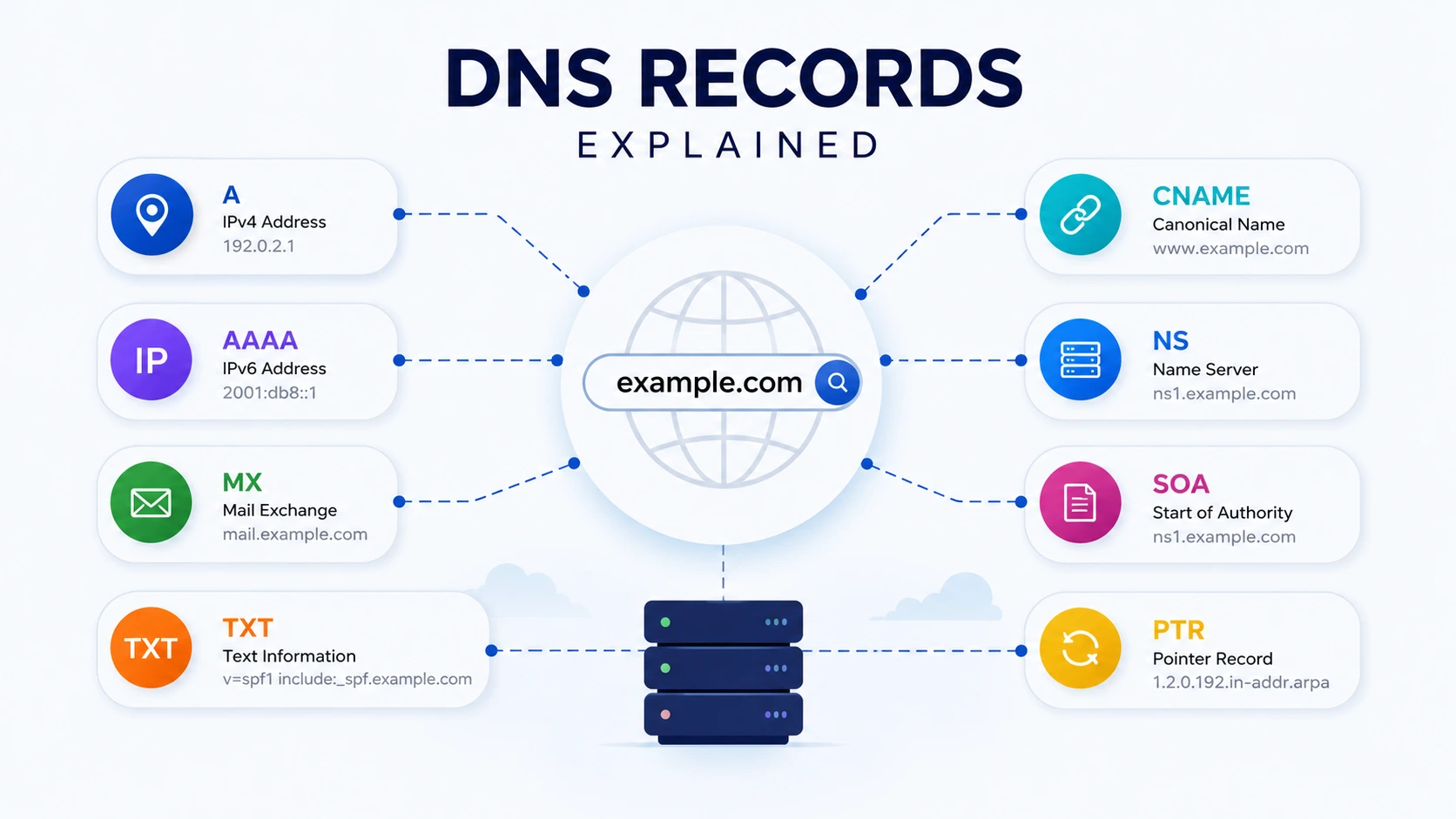
DNS is one of those technologies that quietly keeps the internet working. You type a domain such as example.com into a browser, but computers need DNS information to discover where that domain should lead.
That is where DNS records come in. They store different types of information about a domain, from its server IP address to its email provider and domain verification settings.
In this guide, you will learn what the most common DNS record types mean, when to use them, how they differ, and how a DNS lookup can help you troubleshoot a website or domain.
DNS Records Explained: What Are DNS Records?
DNS records are instructions stored in the Domain Name System that tell DNS resolvers how a domain or hostname should be handled. Different record types serve different purposes. For example, an A record points a hostname to an IPv4 address, an MX record identifies mail servers, and a CNAME record creates an alias for another hostname.
Think of DNS as the internet's address book. A domain name is easy for humans to remember, while DNS records provide the information computers need to locate services.
A typical DNS record contains information such as:
- Name - The domain or hostname
- Type - A, AAAA, MX, TXT, CNAME, and so on
- Value - The information associated with the record
- TTL - How long DNS resolvers can cache the record
Quick example
A simple A record might look like:
example.com A 192.0.2.10This tells DNS resolvers that example.com has an IPv4 address of 192.0.2.10.
The exact values used in real domains depend on the hosting provider, email service, CDN, verification service, or other infrastructure.
Quick takeaway: DNS records connect domain names with destinations, services, and configuration information. Different record types perform different jobs.
The Most Common DNS Record Types
There are many DNS record types, but you will encounter a handful regularly when managing websites, email, APIs, and cloud services.
| Record | Main purpose | Example value |
|---|---|---|
| A | Points to an IPv4 address | 192.0.2.10 |
| AAAA | Points to an IPv6 address | 2001:db8::10 |
| CNAME | Creates a hostname alias | target.example.com |
| MX | Specifies mail servers | mail.example.com |
| TXT | Stores text/configuration data | "verification=..." |
| NS | Specifies authoritative name servers | ns1.example.com |
| SOA | Contains zone authority information | Zone configuration data |
| PTR | Maps an IP address to a hostname | host.example.com |
| SRV | Defines a service endpoint | Service/port information |
Let's look at the most important ones individually.
A Record
An A record maps a hostname to an IPv4 address. IPv4 addresses use the familiar four-part format, such as 192.0.2.10.
For example:
example.com A 192.0.2.10When someone requests the domain, DNS can return the IPv4 address associated with the hostname.
A records are commonly used for:
- Websites
- APIs
- Application servers
- VPS instances
- Cloud infrastructure
If you move a website to a new server and its IPv4 address changes, the A record may need to be updated.
Cloudflare's documentation confirms that A records map domain names to IPv4 addresses and that DNS TTL controls how long responses can be cached.
Important tip
Do not randomly copy an IP address from another website. Your A record should point to the IPv4 address provided by your hosting or infrastructure provider.
AAAA Record
An AAAA record does essentially the same job as an A record, but it points to an IPv6 address.
Example:
example.com AAAA 2001:db8::10IPv6 was designed to provide a much larger address space than IPv4.
The easiest way to remember the difference is:
- A = IPv4
- AAAA = IPv6
A domain can have both A and AAAA records. This allows clients using different IP protocols to potentially connect to the same service.
CNAME Record
A CNAME, or Canonical Name record, creates an alias from one hostname to another hostname.
Example:
www.example.com CNAME example.comInstead of assigning an IP address directly to www.example.com, the CNAME tells DNS that this hostname is an alias for another hostname.
This is useful when a service provider gives you a hostname rather than a fixed IP address.
Common uses include:
- Connecting a subdomain to a SaaS platform
- Pointing www to another hostname
- Connecting domains to hosted services
- Managing infrastructure where the destination hostname may change
A key DNS rule is that a traditional CNAME owner cannot also have other ordinary records at the same name. This behavior is defined in the DNS specifications.
Don't confuse CNAME with URL forwarding. A CNAME operates at the DNS level. It does not perform an HTTP redirect.
MX Record
An MX record tells email systems which mail servers accept email for a domain.
For example:
example.com MX 10 mail.example.comThe number is the preference value. When multiple MX records exist, lower preference values generally have higher priority.
MX records are essential when you use services such as business email providers.
If your website works but incoming email suddenly stops, checking the MX records should be one of your first troubleshooting steps.
Example with multiple MX records
example.com MX 10 mail1.example.com
example.com MX 20 mail2.example.com
The receiving system can use the server with the higher priority first and another server as an alternative according to the mail system's behavior.
TXT Record
A TXT record stores text associated with a domain. Despite its simple name, TXT records are used for many important purposes.
Common examples include:
- Domain ownership verification
- SPF email authorization
- DKIM-related configuration
- Security policies
- Service verification
A simplified example could look like:
example.com TXT "verification=abc123"Another common use is email authentication.
For example, an email provider may ask you to add a TXT record proving that the provider is authorized to send email for your domain.
Important: TXT records are not simply "notes." Their content can be interpreted by specific services and protocols, so you should copy values exactly as provided by the service requesting them.
NS Record
An NS, or Name Server record, identifies the authoritative name servers for a DNS zone.
For example:
example.com NS ns1.example-dns.com
example.com NS ns2.example-dns.com
When you change your domain's nameservers at your registrar, you are effectively changing which DNS infrastructure is authoritative for the domain.
NS records are particularly important when troubleshooting:
- Nameserver changes
- DNS provider migrations
- Delegation problems
- Domains that appear to have inconsistent DNS information
SOA Record
The SOA, or Start of Authority, record contains important administrative and technical information about a DNS zone.
It typically includes information such as:
- Primary authoritative server
- Responsible party information
- Serial number
- Refresh timing
- Retry timing
- Expiration timing
- Minimum/negative caching information
You usually do not edit an SOA record manually unless you understand the DNS provider's configuration.
For most website owners, the important thing is knowing that the SOA record helps describe the authoritative zone and its operational parameters.
PTR Record
A PTR record performs reverse DNS.
Instead of asking:
Which IP address belongs to this hostname?
a reverse DNS lookup asks:
Which hostname is associated with this IP address?
PTR records are commonly associated with reverse DNS configurations and can be important for mail servers and infrastructure.
For example:
192.0.2.10 -> mail.example.comThe actual reverse DNS structure uses the special in-addr.arpa namespace for IPv4 and ip6.arpa for IPv6.
SRV Record
An SRV record helps identify where a particular service is available, including information such as the target hostname and port.
SRV records can be useful for applications that need to discover specific services rather than simply finding a website's IP address.
A simplified example:
_service._tcp.example.com SRV 10 5 443 server.example.comThe exact syntax depends on the service and protocol using the record.
DNS supports application-specific records such as MX, SRV, and NAPTR in addition to basic address and DNS infrastructure records.
DNS Record Types: A vs AAAA vs CNAME vs MX vs TXT
The easiest way to understand these records is to compare their jobs.
| Type | Think of it as | Main question it answers |
|---|---|---|
| A | IPv4 address | "What IPv4 address should I use?" |
| AAAA | IPv6 address | "What IPv6 address should I use?" |
| CNAME | Alias | "What hostname is this an alias for?" |
| MX | Email destination | "Where should email go?" |
| TXT | Verification/configuration | "What text-based DNS information is published?" |
| NS | DNS authority | "Which nameservers are authoritative?" |
| SOA | Zone information | "What are this DNS zone's authority details?" |
| PTR | Reverse mapping | "What hostname maps to this IP?" |
| SRV | Service discovery | "Where is this service available?" |
This distinction makes DNS much easier to understand.
How to Check DNS Records With a DNS Lookup
You do not need to manually inspect DNS configuration files to investigate a domain.
A DNS Lookup tool can query publicly available DNS information and show records associated with a hostname.
You can use the TechbyJeel Tools DNS Lookup to inspect common DNS records for a domain.
Step-by-step
1. Open the DNS Lookup tool.
2. Enter a domain such as example.com.
3. Select the record type you want to inspect, if supported.
4. Run the lookup.
5. Review the returned DNS information.
6. Compare the results with the settings provided by your hosting, email, or DNS provider.
For example, if your website is not loading, check the A and AAAA records.
If incoming email is not working, check the MX records.
If a third-party service says your domain is not verified, check the requested TXT record.
If a subdomain should point to another hostname, inspect its CNAME record.
This simple approach can save significant time during DNS troubleshooting.
Practical tip: Before changing a DNS record, first perform a DNS lookup and record the current configuration. That gives you a reference point if something goes wrong.
What Is TTL in DNS?
TTL stands for Time to Live. It determines how long DNS information can be cached by DNS resolvers before they need to obtain updated information.
For example:
TTL = 3600 secondsThis means the record can generally be cached for up to one hour.
TTL matters when you are changing DNS records. A change may not appear everywhere immediately because different DNS resolvers can still have the previous response cached.
DNS specifications define TTL as the time limit for caching a resource record.
Before a major DNS change
A practical approach is:
1. Identify the records you will change.
2. Check their current TTL.
3. Lower the TTL ahead of a planned migration when appropriate.
4. Make the DNS change.
5. Verify the new records.
6. Restore a sensible TTL after the migration.
Your DNS provider may also impose its own behavior or defaults.
Common DNS Mistakes to Avoid
DNS problems are often caused by small configuration mistakes.
1. Confusing A and CNAME
An A record points to an IP address. A CNAME points to another hostname. They are not interchangeable.
2. Using the wrong MX records
If you change email providers, old MX records can cause mail to be delivered to the wrong destination.
3. Editing TXT values incorrectly
Verification and email authentication records often require exact values. Adding or removing characters can invalidate them.
4. Forgetting IPv6
If your infrastructure uses IPv6, make sure your AAAA configuration is intentional and correct.
5. Expecting DNS changes to be instant
Caching means changes can take time to appear consistently.
6. Changing records without a backup
Before making important DNS changes, save or document your current configuration.
DNS Troubleshooting Checklist
When a domain or service is not working, work through this list:
- Website not loading? Check A and AAAA records.
- Subdomain not working? Check its CNAME or address record.
- Email not arriving? Check MX records.
- Domain verification failing? Check TXT records.
- Nameserver issue? Check NS records.
- Reverse DNS problem? Check PTR configuration.
- Recent DNS change not visible? Check TTL and DNS caching.
- Unexpected result? Compare authoritative DNS information with your DNS provider's dashboard.
You can also use other TechbyJeel Tools utilities when troubleshooting your web infrastructure, such as the IP Lookup and WHOIS Lookup.
Frequently Asked Questions
What is a DNS record?
A DNS record is a piece of information stored in the Domain Name System that tells DNS systems how to handle a domain or hostname. Different records have different purposes. A records map names to IPv4 addresses, MX records handle email routing, and TXT records commonly store verification or authentication information.
What is the difference between A and AAAA records?
An A record maps a hostname to an IPv4 address, while an AAAA record maps it to an IPv6 address. A domain can have both types at the same time. Clients that support IPv6 may use the AAAA result, while IPv4 connections can use the A record.
What is an MX record used for?
An MX record identifies the mail servers responsible for receiving email for a domain. A domain can have multiple MX records with different preference values. When configuring business email, you should use the exact MX records provided by your email service rather than guessing or copying records from another domain.
What is a CNAME record?
A CNAME record creates an alias from one hostname to another hostname. For example, www.example.com could point to example.com using a CNAME. Unlike an A record, the CNAME value is another hostname rather than an IPv4 address. CNAME records are commonly used with hosted and cloud services.
How can I check DNS records?
You can check publicly available DNS information with a DNS lookup tool. Enter the domain and inspect records such as A, AAAA, MX, TXT, CNAME, NS, and SOA. A DNS lookup is useful for verifying configuration, troubleshooting websites, checking email routing, and confirming domain verification records.
Conclusion
Understanding DNS records does not require becoming a networking expert. The key is remembering what each major record does: A and AAAA handle IP addresses, CNAME handles aliases, MX handles email, TXT handles text-based configuration and verification, and NS and SOA describe DNS authority and zone information.
When something goes wrong, do not blindly change records. Start with a DNS lookup, identify the record involved, compare it with your provider's required configuration, and then make one change at a time.
Ready to investigate a domain? Try the free DNS Lookup tool on TechbyJeel Tools and explore the other free developer and networking tools available on the platform.