

How Password Strength Is Calculated: A Simple Guide
Passwords look simple on the surface. Type a few characters, add a number and a symbol, and a website may suddenly display "Strong." But what actually happens behind that label?
Understanding how password strength is calculated can help you create passwords that are genuinely difficult to guess instead of passwords that merely look complicated.
In this guide, you'll learn how password strength is measured, why length matters, how common patterns affect security, what password entropy means, and how a Password Strength Checker can help you evaluate a password before using it.
How Password Strength Is Calculated
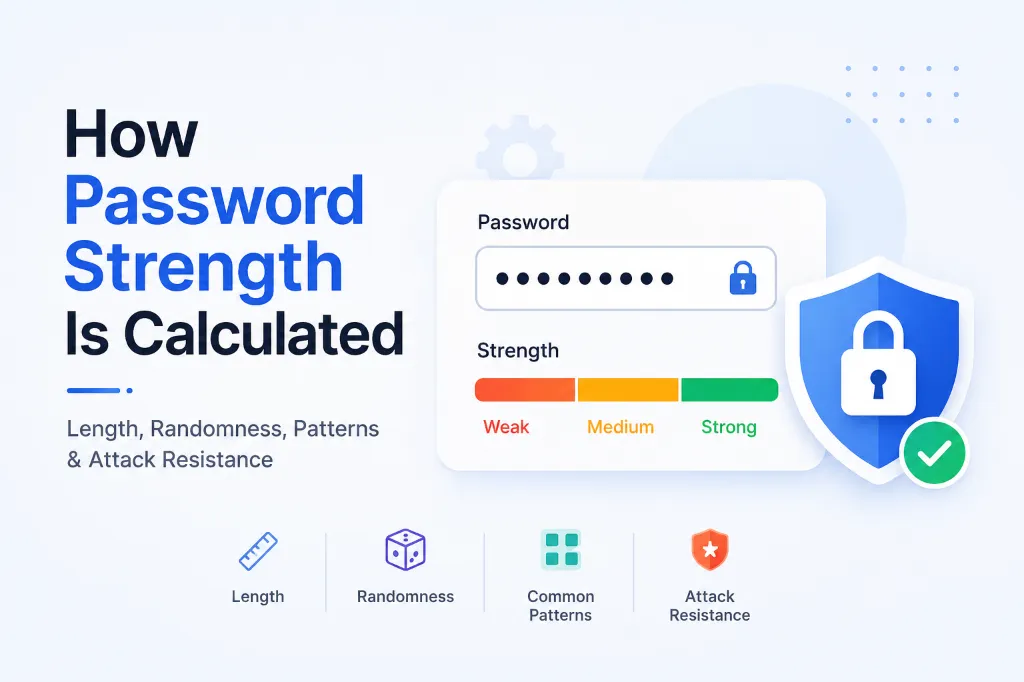
Password strength is calculated by estimating how difficult a password would be for an attacker to guess. Modern password strength checks can consider factors such as length, character patterns, common words, repeated characters, sequences, predictable substitutions, and known or compromised passwords. A longer, unique password or passphrase is generally harder to guess than a short predictable password.
The important point is that password strength is not determined simply by counting uppercase letters, numbers, and symbols.
For example:
Password123!looks complicated but is predictable.Summer2026!contains multiple character types but follows a common pattern.correct-horse-battery-planetis long, but its actual strength depends on how predictable the words are.- A randomly generated password such as
v7$Qm2!rL9@xP4#zcan be much harder to guess.
Modern security guidance increasingly emphasizes length, uniqueness, and resistance to common guessing patterns rather than blindly requiring a mixture of character types. NIST recommends allowing long passwords and avoiding arbitrary composition rules, while OWASP similarly recommends supporting long passphrases and blocking common or compromised passwords. (NIST Pages)
What Makes a Password Strong?
A password strength checker may evaluate several characteristics before deciding whether a password is weak, moderate, strong, or very strong.
| Factor | Why It Matters | Example |
|---|---|---|
| Length | More characters generally increase the search space | 20 characters vs. 8 |
| Uniqueness | Reused passwords are dangerous | One password per account |
| Randomness | Unpredictable characters are harder to guess | Randomly generated string |
| Common patterns | Predictable patterns reduce security | 123456, qwerty |
| Dictionary words | Common words are easier to guess | password |
| Repetition | Repeated characters are predictable | aaaaaa |
| Sequences | Sequential patterns are commonly tested | abcdef, 123456 |
| Personal information | Attackers may know or infer it | Name + birth year |
| Breach history | Known leaked passwords are dangerous | Previously exposed password |
A good password is therefore not simply a password with "one uppercase letter, one number, and one symbol."
It should be difficult to predict.
1. Password Length
Length is one of the most important factors in password security.
Consider these examples:
Tiger1!
Tiger2026!
Tiger2026!Secure
The third password is longer, but that does not automatically make it secure because it still contains predictable words and patterns.
This illustrates an important distinction:
> Longer is generally better, but length works best when combined with unpredictability.
NIST's current guidance for memorized secrets requires subscriber-chosen passwords to be at least 8 characters and recommends allowing passwords of at least 64 characters. It also recommends accepting spaces and avoiding unnecessary composition rules. (NIST Pages)
For everyday users, a long, unique passphrase can be easier to remember than a short password filled with symbols.
Password vs. Passphrase
A password might look like:
J8#vP2!x
A passphrase might look like:
river-cactus-window-orbit
The second option is longer and potentially easier to remember. However, if the phrase is made from common words or a predictable quote, its actual strength may be lower than its length suggests.
Randomness matters.
2. Character Variety
Traditional password rules often focus on character types:
- Lowercase letters
- Uppercase letters
- Numbers
- Symbols
For example:
TechByJeel123!
contains all four categories.
That can satisfy a website's password policy, but it does not necessarily make the password strong.
An attacker does not always try every theoretical combination immediately. Password-cracking tools can prioritize common human choices and predictable transformations.
For example, attackers may test patterns such as:
password
Password
password1
Password1
Password123
P@ssword
P@ssw0rd
Simply replacing o with 0 or adding 123! does not necessarily create meaningful randomness.
OWASP specifically recommends moving away from rigid character-composition requirements and instead focusing on length and blocking common or compromised passwords. (OWASP Cheat Sheet Series)
3. Common Words and Dictionary Attacks
One of the biggest misconceptions about password strength is that a password is secure just because it is long.
Imagine someone uses:
footballfootballfootball
It is 24 characters long.
Yet the password contains the same common word repeated three times. A password-strength algorithm can recognize this type of predictable construction.
This is where dictionary attacks become important.
Instead of trying every possible character combination, an attacker can start with:
1. Common passwords
2. Common English words
3. Names
4. Places
5. Sports teams
6. Popular phrases
7. Dates
8. Keyboard patterns
9. Previously leaked passwords
10. Common substitutions
NIST specifically recommends blocking commonly used or compromised passwords instead of relying entirely on composition rules. (NIST Pages)
4. Repeated Characters and Patterns
Passwords containing obvious repetition are usually weaker than they appear.
Examples include:
aaaaaaaa
11111111
abcabcabc
PasswordPassword
A strength checker may detect repeated characters, repeated sequences, or repeated words.
Similarly, keyboard patterns can reduce strength:
qwerty
asdfgh
zxcvbn
qwerty123
These passwords may technically contain different characters, but the pattern is easy to recognize.
The original zxcvbn password-strength estimator, for example, was designed to identify common passwords, names, words, dates, repeated characters, sequences, keyboard patterns, and common substitutions rather than simply counting character types. (GitHub)
5. Password Entropy Explained
You may have heard the term password entropy.
In simple terms, entropy represents the uncertainty or unpredictability of a password.
For a truly random password selected from a known character set, a basic theoretical estimate can be expressed as:
Entropy = Length × log₂(Character Set Size)
For example, if a system randomly selects characters from a set of 62 possibilities - uppercase letters, lowercase letters, and numbers - then each additional character increases the theoretical number of possible combinations.
However, there is a major catch.
Human-created passwords are not truly random
A human may technically choose from thousands of possible characters and combinations, but people tend to make predictable choices.
For example:
Michael1998!
does not have the same practical strength as a truly random 11-character password simply because both contain a similar number of characters.
This is why modern password-strength tools often estimate guessability rather than presenting a simple theoretical entropy number.
OWASP warns against presenting a precise entropy value as a guarantee of password strength because estimating the entropy of user-created passwords is difficult. (OWASP Cheat Sheet Series)
How a Password Strength Checker Works
A Password Strength Checker typically analyzes the password locally or through a password-strength algorithm and looks for characteristics that make it easier or harder to guess.
Depending on the implementation, it may check:
- Password length
- Character variety
- Dictionary words
- Common passwords
- Repeated characters
- Sequential characters
- Keyboard patterns
- Dates
- Names
- Common substitutions
- Previously compromised passwords
- Estimated number of guesses
A sophisticated estimator can therefore produce a very different result from a basic meter that simply counts uppercase letters, numbers, and symbols.
Example
Consider:
Password123!A basic checker might see:
- Uppercase: Yes
- Lowercase: Yes
- Numbers: Yes
- Symbol: Yes
- Length: 12
It could label the password "Strong."
A more sophisticated checker may recognize:
- Common word:
password - Common number pattern:
123 - Predictable symbol:
! - Predictable capitalization: first letter uppercase
The result could therefore be much weaker.
This is why a password strength score should be treated as an estimate, not a security guarantee.
Password Strength vs. Password Complexity
These two concepts are often confused.
Password complexity usually refers to the types of characters used.
Password strength refers more broadly to how difficult the password is to guess.
| Password | Complexity | Practical Strength |
|---|---|---|
password |
Low | Very weak |
Password1! |
High | Still predictable |
Summer2026! |
High | Predictable |
blue-river-moon-window |
Medium | Depends on predictability |
| Randomly generated unique password | High | Generally much stronger |
A password can therefore be complex but weak.
That is one of the most important lessons when learning how password strength is calculated.
Quick Takeaway
A strong password is not simply a password containing symbols, numbers, and uppercase letters. The strongest passwords are long, unique, difficult to predict, and resistant to common guessing patterns.
If you want to evaluate a password, use a reputable Password Strength Checker as a guide, then follow it with good security practices such as using unique passwords and enabling multi-factor authentication.
TechbyJeel Tools: Try the Password Strength Checker
What Makes a Password Weak?
A password becomes weak when it contains information or patterns an attacker can predict quickly. The most common problems are not always obvious.
Avoid passwords based on:
- Your name or username
- Birthday or birth year
- Phone number
- Company name
- Partner's or pet's name
- Favorite sports team
- Common words
- Keyboard patterns
- Repeated characters
- Simple substitutions such as
@fora - Previous passwords
- Passwords already exposed in a data breach
For example:
Jeel@123
India@2026
Admin123!
Summer2026!
Welcome@123
These may look reasonably complex, but they contain predictable information and patterns.
Why Personal Information Is Dangerous
Attackers do not always start by randomly guessing passwords.
If your name, company, birthday, location, or other information is publicly available, it can potentially become part of a targeted guessing strategy.
This is particularly important for business accounts, social media accounts, email accounts, and administrator accounts.
Never assume that adding your birth year or a symbol to a familiar word makes it unpredictable.
How Password Guessing Attacks Affect Strength
Password strength becomes easier to understand when you look at how attackers actually try to guess passwords.
Brute-Force Attacks
A brute-force attack attempts combinations systematically.
For example:
aaaa
aaab
aaac
...
zzzz
As password length and randomness increase, the number of possible combinations can grow dramatically.
This is why random long passwords can be extremely difficult to guess through exhaustive search.
Dictionary Attacks
Dictionary attacks use lists of likely words and passwords rather than testing every possible combination.
They can include:
- Common passwords
- English words
- Names
- Places
- Sports terms
- Popular phrases
- Previously leaked passwords
- Common variations
A password such as:
football123
may be much easier to guess than a randomly generated password of similar length.
Credential Stuffing
Credential stuffing is different from guessing.
Attackers use username and password combinations leaked from one service and try them on other services.
This is why password reuse is extremely dangerous.
Even if your password is relatively strong, using the same password across five websites creates a major problem. A breach at one website could put your other accounts at risk.
The best defense is simple:
Use a unique password for every important account.
How to Create a Strong Password
Instead of trying to make a short password look complicated, focus on creating something long, unique, and difficult to predict.
Option 1: Use a Password Manager
For important accounts, a password manager can generate random passwords for you.
A generated password might look like:
r7$Kp!4vQ9#Lm2@XzYou don't need to memorize it. The password manager stores it securely so you can use a different password for every account.
Option 2: Use a Long Passphrase
For passwords you actually need to remember, a long passphrase can be easier.
For example:
coffee-river-lamp-orbitBut don't copy this exact example for a real account.
Instead, create a unique passphrase using words that are not connected to your personal information or a famous quotation.
Option 3: Combine Both Approaches
A practical setup is:
1. Use a password manager.
2. Generate random passwords for most websites.
3. Create a strong memorable passphrase for the password manager itself.
4. Never reuse passwords across important accounts.
5. Enable multi-factor authentication wherever available.
How to Use a Password Strength Checker
A Password Strength Checker is useful when you want a quick assessment of a password's characteristics.
Follow these steps:
Step 1: Enter the Password
Enter the password you want to evaluate.
Important: Do not enter sensitive passwords into random websites.
For a real account, prefer a trusted checker that performs the analysis locally in your browser and clearly explains how your password data is handled.
Step 2: Review the Strength Result
The checker may classify the password as:
- Very Weak
- Weak
- Fair
- Strong
- Very Strong
Remember that these labels are estimates.
Step 3: Look at the Problems
A useful checker should explain why a password is weak.
For example:
- Too short
- Common password
- Repeated characters
- Sequential pattern
- Common word
- Predictable substitution
- Easily guessed date
Step 4: Improve the Password
Don't simply add ! to the end.
Instead, consider increasing the length and making the password genuinely unpredictable.
Step 5: Make It Unique
Even a strong password should not be reused across multiple accounts.
A Better Way to Think About Password Strength
Don't ask:
> "Does my password have enough symbols?"
Ask:
> "How predictable is my password?"
That question is much closer to what modern password-strength estimation tries to determine.
Consider these examples:
| Password | Main Problem | Better Approach |
|---|---|---|
password123 |
Extremely common | Use a random password |
John@1998 |
Personal information | Avoid personal details |
Qwerty!123 |
Keyboard + number pattern | Use random characters |
Summer2026! |
Predictable seasonal pattern | Use a unique generated password |
aaaaBBBB1111 |
Repetition | Avoid repeated patterns |
| Random unique password | Low predictability | Good approach |
The goal is not to make a password look complicated.
The goal is to make it difficult to predict.
Password Security Does Not Stop at the Password
A strong password is only one layer of account security.
For important accounts, also consider:
- Multi-factor authentication (MFA) - Adds another verification step.
- Unique passwords - Prevents one breach from affecting multiple accounts.
- Password manager - Makes unique random passwords practical.
- Security alerts - Helps you detect suspicious activity.
- Software updates - Reduce exposure to known vulnerabilities.
- Recovery security - Protects the methods used to recover your account.
For websites and applications, developers should also avoid storing passwords as plain text. Passwords should be processed using appropriate password hashing mechanisms and secure authentication practices.
Practical Password Security Checklist
Before considering a password "good enough," check the following:
- [ ] Is it unique to this account?
- [ ] Is it long enough?
- [ ] Does it avoid personal information?
- [ ] Does it avoid common words and patterns?
- [ ] Is it not based on an old password?
- [ ] Has it never been exposed in a known breach?
- [ ] Can a password manager generate and store it securely?
- [ ] Is multi-factor authentication enabled?
If several answers are "no," improve the password before relying on it.
Try a Password Strength Checker
If you want to understand how different password choices affect estimated strength, use the Password Strength Checker on TechbyJeel Tools.
You can also explore other useful tools:
- JSON Formatter - Format and inspect JSON data.
- Text Tools - Work with common text-processing tasks.
- SEO Tools - Explore tools for website optimization.
Security tip: Never use a real, important account password merely to experiment with an online checker unless you trust how the checker processes the input. A local browser-based checker is preferable because the password can be analyzed without sending it to a server.
Frequently Asked Questions
1. How is password strength calculated?
Password strength is estimated by looking at factors such as length, randomness, common words, repeated characters, sequences, keyboard patterns, predictable substitutions, and known passwords. More advanced checkers estimate how many guesses an attacker might need rather than simply counting uppercase letters, numbers, and symbols.
2. Is a longer password always stronger?
Not necessarily, but length is extremely important. A long password is generally harder to brute-force than a short one. However, predictable phrases, repeated words, or common patterns can reduce practical strength. The best approach is to combine sufficient length with uniqueness and unpredictability.
3. Are special characters required for a strong password?
Special characters can increase the possible character space, but they do not automatically make a password strong. A predictable password such as Password123! can still be easy to guess. Modern guidance places significant emphasis on password length, uniqueness, and blocking commonly used or compromised passwords.
4. What is password entropy?
Password entropy is a way of describing the uncertainty or randomness of a password. For randomly generated passwords, theoretical entropy can be estimated from the password length and possible character set. Human-created passwords are more difficult to measure because people tend to follow predictable patterns.
5. Should I trust a password strength checker?
A password strength checker should be treated as a helpful estimate rather than a guarantee. Prefer tools that explain their privacy practices and perform analysis locally when possible. Never submit an important real-world password to an unknown website simply to check its strength.
Conclusion
Understanding how password strength is calculated makes it easier to stop relying on passwords that only look complicated. Length, uniqueness, randomness, common patterns, and resistance to guessing all matter.
The biggest mistake is assuming that adding a number or symbol automatically creates a secure password. A predictable password can remain weak even when it contains uppercase letters, numbers, and special characters.
For everyday security, use unique passwords, consider a password manager, enable multi-factor authentication, and avoid personal information and common patterns.
Ready to test your password? Try the Password Strength Checker on TechbyJeel Tools and explore more free online tools for everyday tasks.