

Every website you visit uses colors, but computers do not understand colors the same way humans describe them.
You might say "bright blue" or "dark red," while a browser needs a specific color value such as #0066FF, rgb(0, 102, 255), or hsl(216, 100%, 50%).
This is where HEX, RGB, and HSL colors come in. These are three common ways to describe colors in CSS and web design. Once you understand how they work, choosing, changing, and troubleshooting website colors becomes much easier.
In this guide, you'll learn what HEX, RGB, and HSL mean, how each format represents a color, and when each one makes sense to use.
What Are HEX, RGB, and HSL Colors?
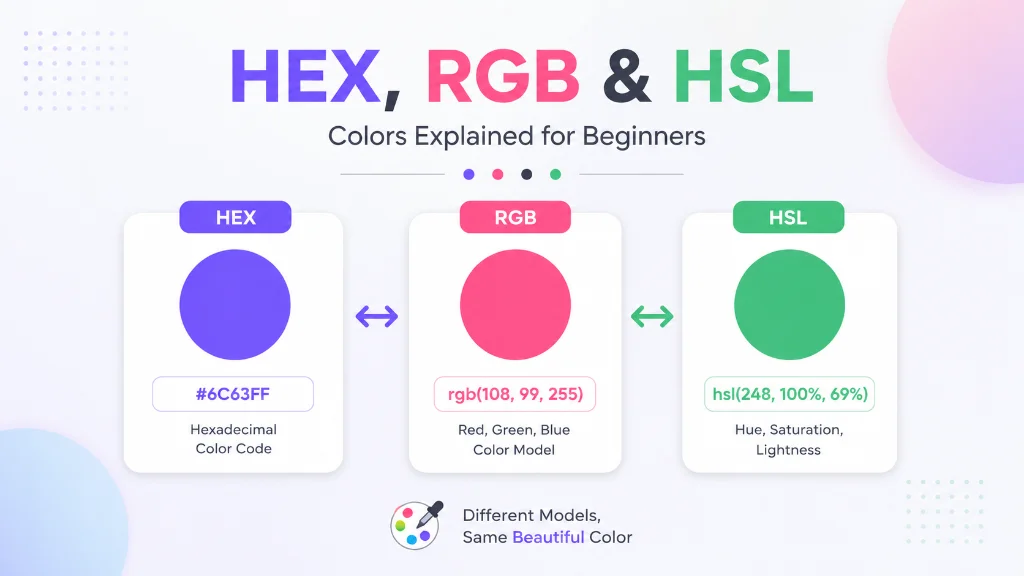
HEX, RGB, and HSL are different ways of representing the same basic thing: a color. HEX uses hexadecimal values, RGB describes the amount of red, green, and blue, while HSL describes hue, saturation, and lightness.
For example, the same blue color can be represented in different ways:
| Format | Example |
|---|---|
| HEX | #0066FF |
| RGB | rgb(0, 102, 255) |
| HSL | hsl(216, 100%, 50%) |
The format changes, but the intended color can remain the same.
Quick answer: HEX is compact and widely used, RGB is useful when working directly with red, green, and blue values, and HSL is often easier for humans to understand when adjusting the appearance of a color.
Why Do Different Color Formats Exist?
Different formats solve different problems.
A developer may prefer HEX because it is short and familiar. Another developer may use RGB when transparency is important. A designer might prefer HSL because changing lightness or saturation is more intuitive.
There is no single format that is always the best.
HEX Colors Explained
HEX is one of the most common color formats you'll see in HTML and CSS.
The name HEX comes from "hexadecimal," a number system that uses 16 symbols:
0 1 2 3 4 5 6 7 8 9 A B C D E F
A standard six-digit HEX color looks like this:
#RRGGBB
The three pairs represent:
- RR = red
- GG = green
- BB = blue
Each pair can range from 00 to FF.
HEX Color Examples
Here are some common examples:
| Color | HEX |
|---|---|
| Black | #000000 |
| White | #FFFFFF |
| Red | #FF0000 |
| Green | #00FF00 |
| Blue | #0000FF |
| Yellow | #FFFF00 |
For example:
color: #FF0000;This tells the browser to display the text in red.
How HEX Values Work
Consider:
#3366CC
Break it into three pairs:
33 66 CC
Each pair controls one RGB channel:
- 33 controls red
- 66 controls green
- CC controls blue
The values are written in hexadecimal rather than the familiar decimal system.
A value of 00 means none of that color channel is present, while FF represents the maximum value.
So:
#000000
means no red, no green, and no blue, resulting in black.
And:
#FFFFFF
means maximum red, maximum green, and maximum blue, resulting in white.
3-Digit HEX Colors
CSS also supports a shorter three-digit form:
#RGB
For example:
#F00
is equivalent to:
#FF0000
Similarly:
#09F
expands to:
#0099FF
The three-digit format is convenient, but six-digit HEX values are often easier to read when working with precise brand colors.
When Should You Use HEX?
HEX is a good choice when:
- You need a simple CSS color value
- You're working with a fixed color palette
- You're using brand colors
- You want compact CSS
- You frequently copy colors from design tools
For example:
.button { background-color: #2563EB; color: #FFFFFF; }It's straightforward and easy to scan.
RGB Colors Explained
RGB stands for Red, Green, and Blue.
Instead of using hexadecimal pairs, RGB uses three numerical values to describe how much red, green, and blue should be combined to create the final color.
The traditional RGB format looks like this:
rgb(red, green, blue)
Each value normally ranges from 0 to 255.
RGB Color Examples
rgb(255, 0, 0) creates red.
rgb(0, 255, 0) creates green.
rgb(0, 0, 255) creates blue.
And:
rgb(0, 0, 0) creates black.
While:
rgb(255, 255, 255) creates white.
How RGB Works
Think of RGB as three separate sliders:
- Red: 0-255
- Green: 0-255
- Blue: 0-255
If all three are set to 0, you get black.
If all three are set to 255, you get white.
If you increase only the red value, the color becomes more red.
For example:
rgb(255, 100, 100) contains a lot of red and smaller amounts of green and blue, producing a light red or pinkish color.
RGB and Transparency
One useful feature of modern CSS is the ability to include an alpha value for transparency.
You may see:
rgba(0, 0, 0, 0.5)
Here:
- 0 = red
- 0 = green
- 0 = blue
- 0.5 = 50% opacity
This can be useful for overlays, shadows, backgrounds, and other visual effects.
Modern CSS can also express this using:
rgb(0 0 0 / 50%)
When Should You Use RGB?
RGB is useful when:
- You're working with color channels directly
- You need transparency
- You're manipulating colors with code
- You're working with graphics or image-related systems
- You want a format that clearly exposes red, green, and blue values
HSL Colors Explained
HSL stands for:
- Hue
- Saturation
- Lightness
Unlike RGB, HSL describes colors in a way that can feel more natural to humans.
The basic CSS syntax is:
hsl(hue, saturation, lightness)
For example:
hsl(0, 100%, 50%) represents red.
What Is Hue?
Hue represents the basic color itself.
It is expressed as a value from 0 to 360 degrees around a color wheel.
Some common hue positions are approximately:
| Hue | Color |
|---|---|
| 0° | Red |
| 60° | Yellow |
| 120° | Green |
| 180° | Cyan |
| 240° | Blue |
| 300° | Magenta |
| 360° | Red |
So:
hsl(240, 100%, 50%) represents a strong blue.
What Is Saturation?
Saturation controls how intense or vivid the color is.
It is expressed as a percentage from 0% to 100%.
- 0% = no color intensity, resulting in gray
- 100% = maximum saturation
For example:
hsl(0, 100%, 50%) is a vivid red.
While:
hsl(0, 20%, 50%) is a much less saturated, muted red.
What Is Lightness?
Lightness controls how light or dark the color appears.
It ranges from 0% to 100%.
- 0% = black
- 50% = normal color
- 100% = white
For example:
hsl(240, 100%, 50%) is a strong blue.
Changing only the lightness:
hsl(240, 100%, 30%) creates a darker blue.
And:
hsl(240, 100%, 70%) creates a lighter blue.
This makes HSL particularly useful when you need multiple shades of the same base color.
HEX vs RGB vs HSL: Quick Comparison
| Feature | HEX | RGB | HSL |
|---|---|---|---|
| Full name | Hexadecimal | Red Green Blue | Hue Saturation Lightness |
| Main values | 00-FF | 0-255 | Hue 0-360, others % |
| Beginner-friendly | Yes | Yes | Yes |
| Easy to create shades | Moderate | Moderate | Excellent |
| Transparency | Modern syntax supported | Excellent | Excellent |
| Common in CSS | Very common | Very common | Very common |
| Best for | Fixed colors | Channel control | Color adjustments |
Which Format Is Best?
There is no universal winner.
Use HEX when you want a compact, familiar value for a fixed color.
Use RGB when you need direct control over red, green, and blue channels or transparency.
Use HSL when you want to easily adjust the hue, intensity, or lightness of a color.
For beginners, learning all three is more valuable than trying to choose just one.
A Simple Way to Remember Them
If you're struggling to remember the difference, use this shortcut:
- HEX = color code
- RGB = color ingredients
- HSL = color appearance
For example, if you already know the exact brand color, HEX is convenient.
If you're thinking about how much red, green, and blue are being mixed, RGB makes sense.
If you're thinking, "I like this blue, but I want it darker and less intense," HSL is often easier to work with.
Key Takeaway
HEX, RGB, and HSL are simply different ways to describe colors. They can all be used in CSS, but each format gives you a different way to think about and control a color.
HEX is compact, RGB works directly with color channels, and HSL makes visual adjustments easier. Understanding these differences gives you a solid foundation for working with colors in web design and development.
How to Convert HEX to RGB
Converting HEX to RGB sounds complicated at first, but the basic idea is simple.
A six-digit HEX color contains three pairs:
#RRGGBB
Each pair represents red, green, and blue.
For example:
#3366CC
contains:
33 = Red 66 = Green CC = Blue
Because HEX uses base 16 while RGB uses decimal values from 0 to 255, each HEX pair needs to be converted into a decimal number.
Example: HEX to RGB
Take:
#3366CC
Convert each pair:
- 33 HEX = 51 RGB
- 66 HEX = 102 RGB
- CC HEX = 204 RGB
Therefore:
#3366CC
becomes:
rgb(51, 102, 204)
You don't need to perform these calculations manually every time. A color converter can do this instantly and reduce the chance of mistakes.
How to Convert RGB to HEX
The reverse process converts three RGB values into hexadecimal pairs.
Suppose you have:
rgb(51, 102, 204)
Convert each number into hexadecimal:
- 51 → 33
- 102 → 66
- 204 → CC
Combine them:
#3366CC
So:
rgb(51, 102, 204)
and:
#3366CC
represent the same color.
Why RGB to HEX Conversion Is Useful
This conversion is common when:
- A design gives you RGB values
- Your CSS uses HEX colors
- You're documenting brand colors
- You're converting values between design and development tools
- You're cleaning up an existing stylesheet
How to Convert RGB to HSL
RGB and HSL use completely different systems, so this conversion is more involved.
RGB describes a color through red, green, and blue channels.
HSL describes the same color through:
- Hue
- Saturation
- Lightness
For example, a color might be represented as:
rgb(51, 102, 204)
and approximately as:
hsl(220, 60%, 50%)
The exact HSL values depend on the RGB values and conversion calculation.
Why Convert RGB to HSL?
HSL becomes useful when you want to modify a color without changing its basic hue.
Imagine you have a brand blue and want:
- A lighter version for a background
- A darker version for buttons
- A muted version for secondary elements
With HSL, you can adjust lightness or saturation while keeping the hue consistent.
This is one reason HSL can be convenient for creating color variations.
How to Convert HSL to HEX
HSL can also be converted into HEX.
Suppose you have:
hsl(220, 60%, 50%)
A converter can calculate the equivalent RGB values and then convert those RGB values into HEX.
The process is essentially:
HSL ↓ RGB ↓ HEX
You generally don't need to perform the mathematics yourself.
For practical work, using a reliable color converter tool is faster and less error-prone.
HEX vs RGB vs HSL: Which Should You Use?
The best format depends on what you're trying to accomplish.
| Situation | Recommended Format | Why |
|---|---|---|
| Fixed brand color | HEX | Compact and easy to store |
| Simple CSS colors | HEX | Easy to read |
| Transparency | RGB / HSL | Alpha can be included |
| Adjusting brightness | HSL | Lightness is explicit |
| Adjusting intensity | HSL | Saturation is explicit |
| Working with RGB channels | RGB | Direct channel control |
| Creating color variations | HSL | Easier visual adjustments |
| Copying a color from a design | Depends | Match the design tool's format |
There is no need to force every project to use one format.
A well-maintained stylesheet can even contain more than one color format when there is a practical reason.
Using HEX, RGB, and HSL in CSS
CSS supports multiple ways of defining colors.
HEX in CSS
button { background-color: #2563EB; color: #FFFFFF; }This is one of the simplest approaches for fixed colors.
RGB in CSS
button { background-color: rgb(37, 99, 235); color: rgb(255, 255, 255); }RGB makes the individual red, green, and blue values visible.
HSL in CSS
button { background-color: hsl(217, 83%, 53%); color: hsl(0, 0%, 100%); }HSL can make it easier to understand how the color's hue, saturation, and lightness are being controlled.
Using Transparency
Modern CSS also supports alpha values.
For example:
.overlay { background-color: rgb(0 0 0 / 50%); }This creates black at 50% opacity.
You can also use HSL with alpha:
.overlay { background-color: hsl(0 0% 0% / 50%); }This is useful for overlays, menus, modal backgrounds, shadows, and other UI elements.
Common Beginner Mistakes With Color Codes
Understanding the formats is important, but knowing what not to do is equally useful.
1. Mixing Up RGB Order
RGB always follows:
Red → Green → Blue
So:
rgb(255, 0, 0) is red.
If you accidentally change the order, you'll get a completely different color.
2. Using Invalid HEX Characters
HEX values can use:
0-9 A-F
For example:
#12ABEF is valid.
But:
#12GXYZ is not a valid standard HEX color.
3. Thinking HSL Saturation Means Brightness
Saturation and lightness are different.
Saturation controls color intensity.
Lightness controls how light or dark the color appears.
Changing the wrong value can produce a result very different from what you expected.
4. Using Extreme Colors Without Testing Them
Pure colors such as:
#FF0000 #00FF00 #0000FF
are useful for understanding color systems, but they aren't automatically good choices for user interfaces.
A professional interface usually needs a carefully balanced color palette.
5. Ignoring Contrast
A color can look attractive on its own but become difficult to read when placed against another color.
For example, light gray text on a white background may have poor readability.
Always consider text and background contrast when designing interfaces.
Tips for Choosing Better Website Colors
Color selection isn't only about making a website look attractive. It also affects readability, accessibility, branding, and user experience.
Keep Your Color Palette Small
You don't need dozens of unrelated colors.
A simple website might use:
- One primary color
- One secondary color
- One accent color
- Neutral background colors
- Text colors
- Success, warning, and error colors
Create Shades From One Base Color
HSL can be particularly useful here.
For example, if your primary color is blue, you can create:
- Dark blue for headings
- Standard blue for buttons
- Light blue for backgrounds
- Very light blue for cards
Keeping the hue consistent can make the interface feel more cohesive.
Test Colors on Real Content
Don't judge a color only from a color picker.
Put it into an actual interface and test:
- Buttons
- Headings
- Paragraph text
- Cards
- Forms
- Navigation
- Dark and light backgrounds
A color that looks great in isolation may not work well in a complete design.
Check Accessibility
Good color design should consider users who have difficulty distinguishing certain colors.
The W3C Web Content Accessibility Guidelines provide recommendations for accessible web content, including requirements related to contrast.
For important text, buttons, and interface elements, don't rely on color alone to communicate information.
Use Color Tools to Work Faster
Manually converting colors is useful for learning, but it's not an efficient workflow when you're working with dozens of colors.
A dedicated color tool can help you:
- Pick colors
- Convert HEX to RGB
- Convert RGB to HEX
- Convert between color formats
- Inspect color values
- Create consistent palettes
- Test color combinations
You can also use other TechbyJeel Tools when working on web projects. For example, an Image Compressor can help reduce image file sizes, while a JSON Formatter can make configuration data easier to inspect.
For PDF-related workflows, the PDF Merge Tool can combine multiple PDF documents into one file.
Pro tip: Don't waste five minutes manually calculating a color conversion that a reliable online tool can perform in seconds. Learn the underlying concept, then automate the repetitive part.
HEX vs RGB vs HSL: A Practical Example
Imagine you're building a landing page for a SaaS product.
Your designer gives you this brand color:
#2563EB
You could use it directly:
.primary-button { background: #2563EB; }Now you need a slightly transparent version for a background.
RGB may be convenient:
.hero-background { background: rgb(37 99 235 / 10%); }Then you want a darker version of the same blue for hover states.
HSL can make the adjustment easier because you can reduce the lightness while keeping the hue and saturation relatively consistent.
This illustrates an important point:
You don't need to treat HEX, RGB, and HSL as competing formats. They are tools for different jobs.
A Simple Decision Guide
When you're unsure which format to use, ask yourself one question:
What am I trying to do with this color?
Choose HEX when:
- You already know the exact color
- You want short, readable CSS
- You're defining brand colors
- You're building a fixed color palette
Choose RGB when:
- You're working with red, green, and blue values
- You need transparency
- You're manipulating color channels programmatically
Choose HSL when:
- You want to create color variations
- You need to adjust brightness
- You want to change saturation
- You're building a flexible color system
Final Takeaway
HEX, RGB, and HSL colors are different representations of color, not completely different types of color. The same color can often be expressed using all three formats, and the best choice depends on your workflow.
HEX is excellent for simple, fixed colors. RGB is useful for channel-level control and transparency, while HSL is especially convenient when creating lighter, darker, or less saturated variations.
If you're learning CSS, don't try to memorize everything at once. Start by understanding what each format represents, then practice converting and using them in small projects.
Ready to work with colors faster? Explore TechbyJeel Tools and use free online color utilities for your next web design or development project.
Frequently Asked Questions
What is the difference between HEX, RGB, and HSL?
HEX represents colors using hexadecimal values, RGB uses red, green, and blue values from 0 to 255, and HSL uses hue, saturation, and lightness. All three can represent many of the same colors, but each format is useful for different design and development tasks.
Which color format is best for CSS?
There is no single best format for every CSS project. HEX is convenient for fixed colors and brand palettes, RGB works well when you need channel values or transparency, and HSL is useful when you frequently adjust saturation or lightness.
Can HEX, RGB, and HSL represent the same color?
Yes. A single color can usually be represented using HEX, RGB, or HSL. For example, one blue may have a HEX value, an equivalent RGB value, and an equivalent HSL value. The numerical representation changes, but the resulting color can remain visually equivalent.
Is HSL easier than RGB for beginners?
HSL can be easier when you're thinking about how a color looks rather than how it is mathematically constructed. Hue represents the color, saturation controls intensity, and lightness controls brightness. This makes HSL useful for creating related shades and variations.
How can I convert HEX to RGB quickly?
You can manually convert each two-character HEX pair into a decimal RGB value, but an online color converter is much faster for everyday work. Enter the HEX value, and the tool can provide the corresponding RGB and other supported color formats.