

Barcode vs QR Code: What's the Difference?
You see barcodes every day - on product packaging, shipping labels, tickets, invoices, and inventory tags. QR codes are everywhere too, from restaurant menus and payment systems to event tickets and marketing campaigns.
But barcode vs QR code is not simply a question of which one looks better. They use different ways of storing information, have different scanning requirements, and are designed for different situations.
In this guide, you'll learn how traditional barcodes and QR codes work, how they differ, what each one can store, and when you should use one instead of the other.
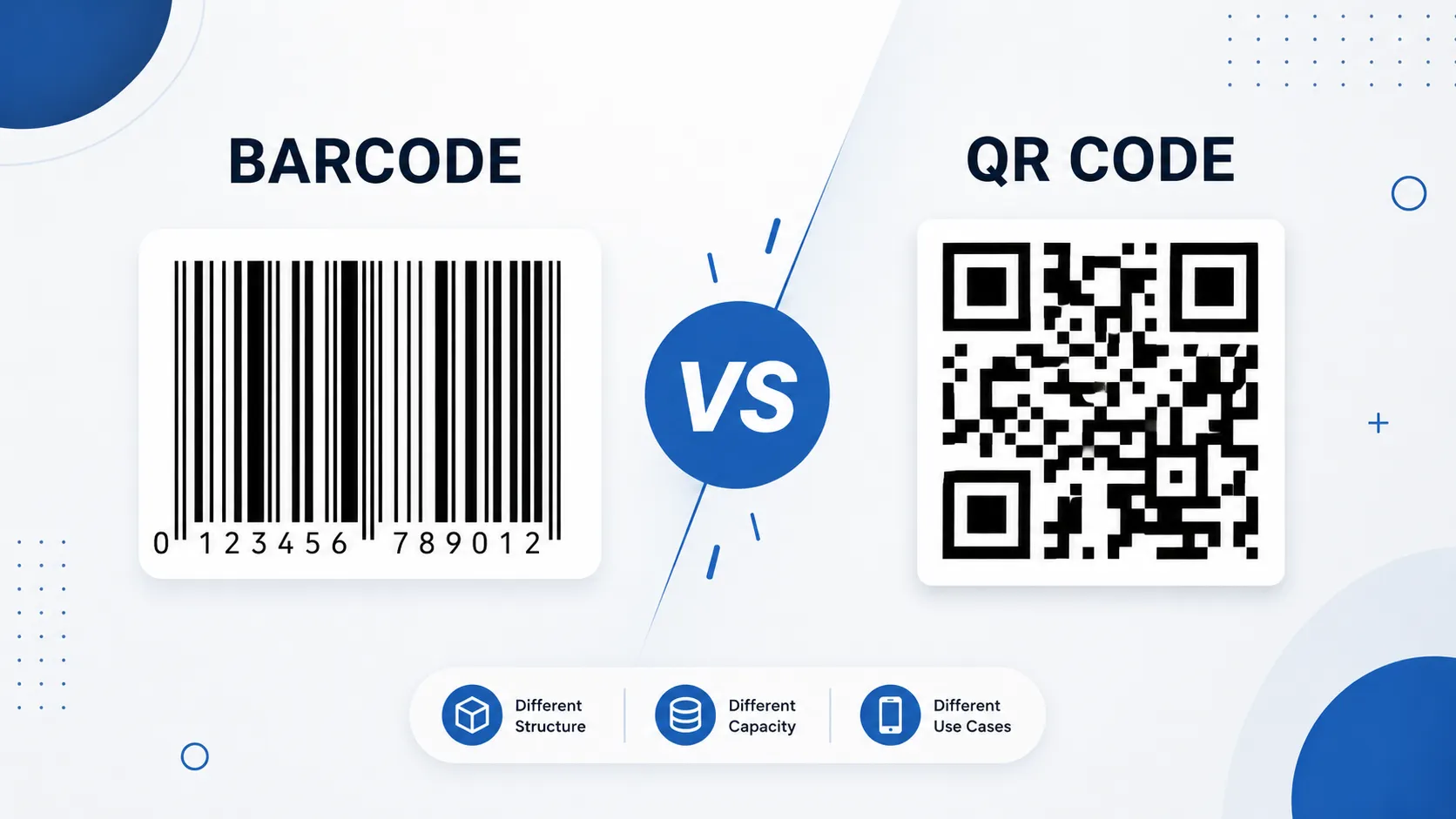
Quick answer: A traditional barcode usually stores information using lines and spaces in one dimension, while a QR code stores information in a two-dimensional grid. QR codes generally hold much more data and can be scanned easily with modern smartphones, while traditional barcodes remain extremely common for product identification and retail systems.
What Is a Barcode?
A barcode is a machine-readable representation of information using a visual pattern that a scanner can interpret.
When people say "barcode," they often mean a 1D or linear barcode made from vertical bars and spaces of different widths. Common examples include UPC and EAN barcodes found on retail products.
According to GS1, barcodes can be scanned electronically using laser or image-based technology and are widely used for automatic identification and data capture.
For example, when a cashier scans a product at a supermarket, the scanner reads the barcode and sends its encoded information to the store's computer system.
The barcode itself usually does not contain the entire product description or price. Instead, it commonly contains an identifier that allows a database to retrieve additional information.
Common barcode examples
Some common barcode formats include:
- UPC-A - widely used for retail products
- EAN-13 - common on products internationally
- EAN-8 - designed for smaller packages
- Code 128 - commonly used for logistics and inventory
- ITF-14 - frequently used in distribution and shipping
- GS1-128 - used for supply-chain applications
GS1 maintains multiple barcode types because different industries and applications have different identification requirements.
How does a traditional barcode work?
A traditional barcode represents information through the widths and spacing of printed bars.
A scanner shines light onto the barcode or captures an image of it. The scanner detects the pattern and converts it into data that software can understand.
The process is essentially:
1. A number or identifier is assigned.
2. The identifier is encoded into a barcode.
3. The barcode is printed on a product or label.
4. A scanner reads the pattern.
5. Software interprets the encoded value.
6. A database or system retrieves the related information.
This makes barcodes extremely useful for fast and accurate identification.
What Is a QR Code?
A QR code, short for Quick Response Code, is a type of two-dimensional barcode that stores information using a square pattern of dark and light modules.
Unlike a traditional linear barcode, a QR code stores information across both the horizontal and vertical dimensions. This allows it to hold considerably more information in a relatively small physical area.
QR codes were originally developed for industrial applications in Japan and later became widely adopted across many industries.
Today, you can find them on:
- Restaurant menus
- Product packaging
- Business cards
- Event tickets
- Payment pages
- Wi-Fi instructions
- Marketing materials
- Product information pages
- Authentication and verification workflows
QR Code is also standardized internationally through ISO/IEC 18004:2024, which specifies characteristics such as encoding methods, symbol formats, error correction, and decoding requirements.
How does a QR code work?
A QR code converts information into a pattern of square modules.
For example, a QR code can contain:
https://example.com
A smartphone camera or QR scanning application recognizes the pattern, decodes the information, and performs the appropriate action.
For a URL, this usually means opening the website in a browser.
The basic process is:
1. Information is selected.
2. The information is encoded into a QR code.
3. The QR code is displayed or printed.
4. A camera captures the complete QR pattern.
5. Software decodes the pattern.
6. The device displays or uses the stored information.
One major advantage is that QR codes can store different kinds of data, including text, URLs, and other character types. DENSO WAVE, the original developer of QR Code, states that QR Code can encode up to 7,089 numeric characters under its specified maximum capacity.
Barcode vs QR Code: The Main Differences
The easiest way to understand the barcode vs QR code difference is to compare how each technology stores and accesses information.
| Feature | Traditional Barcode | QR Code |
|---|---|---|
| Type | 1D / linear | 2D |
| Visual structure | Lines and spaces | Square modules |
| Data direction | Mainly horizontal | Horizontal and vertical |
| Data capacity | Usually lower | Usually much higher |
| Common scanner | Barcode scanner | Smartphone camera or 2D scanner |
| Common use | Retail and inventory | Links, payments, marketing, tickets |
| Smartphone scanning | Usually requires suitable app/scanner | Commonly supported by phone cameras |
| Physical efficiency | Requires more linear space as data increases | Can store more information in a compact area |
| Error correction | Depends on barcode type/system | Built into QR Code design |
| Best known for | Product identification | Direct access to digital information |
The important point is that QR codes are also barcodes. More specifically, they are a type of two-dimensional barcode.
So saying "barcode vs QR code" is technically similar to comparing a particular category with another member of the broader category.
GS1 distinguishes between linear barcodes and two-dimensional barcodes, with QR Code included among the 2D formats used within the GS1 system.
1D Barcode vs 2D Barcode
Understanding 1D vs 2D barcodes makes the difference much easier to remember.
1D barcodes
A traditional barcode is usually one-dimensional because information is primarily encoded along one axis.
Think of a product barcode at a supermarket:
|||| ||| | |||| || |||
The widths and spaces represent encoded information.
1D barcodes are excellent when you need to identify something quickly using a relatively small amount of structured data.
2D barcodes
A QR code is two-dimensional because information is encoded across both axes.
Visually, it looks more like a grid:
██ ████ ██ ████ ██ ███ ██ ██████ ██ ████ ██ ████
The actual QR pattern is much more complex than this simplified example.
Because data can be encoded vertically as well as horizontally, 2D barcodes can hold substantially more information in a compact symbol. GS1 explains that 2D barcodes can hold more data than 1D barcodes while remaining physically smaller.
Why QR Codes Can Store More Information
This is one of the biggest differences in the barcode vs QR code comparison.
A traditional 1D barcode has a limited amount of space along a single direction. As more information is added, the barcode generally needs to become longer or use a different symbol design.
A QR code uses a two-dimensional grid, giving it considerably more room to represent data.
For example, a simple product barcode may primarily identify an item, while a QR code can contain:
- A website URL
- Contact information
- Plain text
- Product information
- Digital instructions
- Location information
- Wi-Fi connection details
- Other structured data
However, more capacity does not automatically mean QR codes are better.
If a retail system only needs to identify a product using a standardized product number, a traditional EAN or UPC barcode may be exactly what the system requires.
That is why both technologies continue to exist.
When Should You Use a Barcode?
Traditional barcodes are often the better choice when your main goal is identification and tracking.
Common examples include:
Retail products
Supermarkets and retail stores frequently use UPC and EAN barcodes to identify products during checkout.
Inventory management
Warehouses can use barcodes to identify products, shelves, packages, and stock movements.
Shipping and logistics
Barcodes can help businesses track packages and logistics units as they move through supply chains.
Asset tracking
Companies can place barcodes on equipment, computers, tools, or other physical assets to simplify identification.
Simple rule: If you mainly need a machine to identify a physical item quickly, a traditional barcode may be the practical choice.
GS1 notes that barcodes play an important role in supply chains by allowing businesses to automatically identify and track products as they move through distribution systems.
When Should You Use a QR Code?
QR codes become especially useful when you want to connect a physical object to digital information.
For example, a restaurant can place a QR code on a table that opens its online menu.
A business card can use a QR code to send someone directly to a website or contact page.
A product package can use a QR code to provide additional digital information.
Common QR code applications include:
- Website links
- Digital menus
- Payments
- Event tickets
- Marketing campaigns
- Product information
- Customer instructions
- Wi-Fi sharing
- App downloads
GS1 highlights the ability of QR Codes to connect consumers with web-based product information and other digital experiences.
> TechbyJeel Tools Tip: If you need to create or work with barcodes online, use the Barcode Tools available on TechbyJeel Tools to simplify common barcode-related tasks. Explore Barcode Tools
The Key Takeaway So Far
The barcode vs QR code comparison is not really about replacing one technology with another.
Traditional 1D barcodes are optimized for fast identification and are deeply integrated into retail, inventory, and supply-chain systems. QR codes are 2D barcodes that can store significantly more information and are particularly useful when you want a physical scan to lead to digital content.
In Part 2, we'll go deeper into scanning, data capacity, security, error correction, real-world examples, advantages and disadvantages, and a practical barcode vs QR code comparison to help you choose the right option.
Trusted References
- GS1 Barcode Standards
- GS1 - What Is a Barcode?
- GS1 - What Is a QR Code?
- DENSO WAVE - What Is a QR Code?
- ISO/IEC 18004:2024
Barcode vs QR Code: Which Is Better?
There is no universal winner in the barcode vs QR code comparison. The better option depends on what you need to store, how people will scan it, and what system will process the information.
A traditional barcode is usually the better choice for product identification, inventory, retail, and supply-chain applications. A QR code is often better when you want to store more information or connect a physical object directly to digital content.
Choose a barcode when:
- You need to identify products quickly.
- Your business already uses barcode scanners.
- You are working with retail product numbers.
- You need inventory or asset identification.
- The barcode will be processed by an existing supply-chain system.
- You only need a relatively small amount of structured data.
Choose a QR code when:
- You want to send users to a website.
- You need to store more information.
- People will scan using smartphones.
- You want to connect printed materials with online content.
- You need error correction for damaged symbols.
- You want one code to support a broader digital experience.
Simple rule: Use a traditional barcode primarily for machine-readable identification. Use a QR code when the scan needs to provide richer digital information or interaction.
Barcode vs QR Code: Data Capacity
Data capacity is one of the most important differences between the two technologies.
Traditional 1D barcodes are generally designed around relatively compact identifiers. For example, a retail barcode can represent a product identifier that a point-of-sale system uses to find the product in its database.
QR codes can encode much larger amounts of information. DENSO WAVE states that a QR Code can encode up to 7,089 numeric characters under its maximum capacity conditions. Actual capacity depends on the QR version, character type, error correction level, and other encoding factors. DENSO WAVE's QR Code documentation provides additional technical details.
This does not mean you should put thousands of characters into every QR code.
A smaller QR code is generally easier to print, scan, and use. For a website link, a short URL is often more practical than embedding unnecessary text.
How Scanning Works
Another important barcode vs QR code difference is how the symbols are scanned.
Traditional barcode scanning
Many traditional barcode systems use dedicated scanners designed for fast, repeated scanning.
For example, a supermarket checkout can scan product barcodes hundreds of times during a busy day. These systems are optimized for speed and integration with retail software.
QR code scanning
QR codes are commonly scanned using cameras and image-processing software.
Modern smartphones can recognize many QR codes directly through their camera applications. The user points the camera at the code, and the device identifies the pattern.
The process is convenient because users generally do not need specialized hardware.
However, QR codes still need to be properly printed or displayed. Poor contrast, excessive distortion, insufficient size, or an unsuitable scanning distance can make any machine-readable code harder to scan.
QR Code Error Correction
One useful QR Code feature is error correction.
QR Codes use Reed-Solomon error correction, allowing a QR symbol to remain readable even when part of the code has been damaged or obscured. The available error correction levels include Low, Medium, Quartile, and High.
Higher error correction can improve resilience, but it also requires more encoded data and can make the QR symbol more complex.
This creates an important practical trade-off:
| Error Correction | Typical Level | Practical Consideration |
|---|---|---|
| Low | L | More data capacity, less recovery |
| Medium | M | Balanced option |
| Quartile | Q | Better recovery |
| High | H | Stronger recovery, lower capacity |
For ordinary applications, you should avoid choosing the highest level simply because it sounds better. Select an appropriate level based on the expected environment.
The QR Code standard specifies these error correction mechanisms as part of the technology's design. ISO/IEC 18004:2024 defines the international specification for QR Code.
Are QR Codes More Secure Than Barcodes?
Not automatically.
This is a common misunderstanding.
A QR code can contain a URL, and that URL can lead to a legitimate website or a malicious website. The visual appearance of the QR code does not tell you whether the destination is trustworthy.
For example:
QR Code → https://example.com → Website
The QR code is simply carrying the information. Security depends on what that information points to and how the receiving system handles it.
QR code safety tips
Before scanning an unfamiliar QR code:
- Check the destination URL.
- Look for unexpected spelling or suspicious domains.
- Avoid entering passwords or payment information on unfamiliar websites.
- Be cautious with QR codes placed over legitimate stickers or signs.
- Keep your phone and browser updated.
QR codes can be extremely useful, but convenience should not replace basic security awareness.
Real-World Examples
Understanding actual use cases makes the barcode vs QR code difference easier to remember.
Example 1: Supermarket product
A packet of biscuits has an EAN barcode.
The cashier scans it, and the store system identifies the product.
Best choice: Traditional barcode.
Example 2: Restaurant menu
A restaurant wants customers to open a digital menu.
A QR code is printed on each table.
Best choice: QR code.
Example 3: Warehouse inventory
A warehouse needs to identify thousands of products and connect them to an inventory management system.
Best choice: Usually a traditional barcode, although 2D codes may also be appropriate depending on the system.
Example 4: Product packaging
A manufacturer wants customers to access product instructions, videos, warranty information, or a website.
Best choice: QR code.
Example 5: Event ticket
An event organizer needs to provide a digital ticket that can be scanned at the entrance.
Best choice: QR code or another appropriate 2D barcode, depending on the ticketing system.
Advantages and Disadvantages
Traditional barcode advantages
- Simple and widely adopted
- Fast for retail scanning
- Works well with existing barcode systems
- Excellent for product identification
- Supported by many dedicated scanners
- Familiar to businesses and consumers
Traditional barcode disadvantages
- Limited data capacity compared with 2D codes
- Usually requires more linear space as information increases
- Less suitable for storing long URLs or large amounts of data
- Often depends on dedicated scanning equipment in business environments
QR code advantages
- Stores substantially more information
- Can contain URLs and other digital content
- Easily scanned by many smartphones
- Can remain readable despite some damage
- Connects physical products with online experiences
- Works well for marketing and customer engagement
QR code disadvantages
- Can become visually dense with large amounts of data
- Requires appropriate size and print quality
- Users should verify links before trusting them
- Not every existing business system is designed around QR codes
Barcode vs QR Code: Quick Decision Guide
Use this simple decision process:
1. Do you need to identify a product or physical asset?
Yes → Consider a traditional barcode.
No → Continue.
2. Do you want users to open a website or digital resource?
Yes → A QR code is usually a strong option.
No → Continue.
3. Do you need to store more information in a compact symbol?
Yes → Consider a QR code.
No → A traditional barcode may be sufficient.
4. Does your existing system require a specific barcode format?
Yes → Follow that system's requirements rather than choosing based only on appearance.
The most important lesson is that technology should follow the use case. Do not select a QR code simply because it is newer or more visually interesting.
Create and Work With Barcodes Online
If you are building product labels, inventory systems, marketing materials, or testing barcode formats, online tools can make the process faster.
TechbyJeel Tools provides free browser-based tools designed for common digital tasks. You can also explore related tools such as the JSON Formatter, Image Compressor, and PDF Merge tools when preparing digital assets and documents around your barcode workflow.
Quick tip: Always test a generated barcode or QR code with the actual scanner or smartphone that your audience will use. A code that looks perfect on your screen can still fail when printed too small or displayed with poor contrast.
Barcode vs QR Code: Frequently Asked Questions
Is a QR code a barcode?
Yes. A QR code is a type of two-dimensional barcode. Traditional barcodes commonly use one-dimensional patterns of lines and spaces, while QR codes use a two-dimensional grid to encode information.
Which stores more information, a barcode or QR code?
A QR code generally stores much more information than a traditional 1D barcode. Its two-dimensional structure allows data to be encoded across both horizontal and vertical dimensions, making QR codes suitable for URLs, text, and other information.
Can my phone scan a barcode?
Many smartphones can scan QR codes directly through their camera applications, but traditional 1D barcodes may require a compatible scanning application. Dedicated barcode scanners are still widely used in retail, warehouses, and other business environments.
Are QR codes safer than barcodes?
Neither technology is automatically safer. A QR code can contain a URL that leads to a malicious website, so users should check the destination before entering sensitive information. Security depends on how the technology and encoded information are used.
Should I use a barcode or QR code for my business?
Choose based on your use case. Traditional barcodes are excellent for product identification, inventory, and retail systems. QR codes are often better for websites, digital information, marketing, tickets, and situations where smartphone scanning is useful.
Conclusion
The barcode vs QR code difference comes down to structure, capacity, scanning, and purpose. Traditional barcodes remain highly effective for product identification and inventory, while QR codes are designed to store more information and connect physical experiences with digital content.
Neither technology makes the other obsolete. Businesses should choose the format that fits their existing systems, data requirements, scanning environment, and customer experience.
Ready to create or work with machine-readable codes? Explore the free Barcode Tools on TechbyJeel Tools and simplify your workflow today.