

JSON looks simple until you're staring at a massive response from an API with everything packed into one unreadable line. Then a tiny missing comma or quotation mark can turn a working data structure into an error that is surprisingly difficult to find.
That's where the difference between a JSON formatter and JSON validator becomes important. Both tools help you work with JSON, but they solve different problems: one focuses mainly on readability, while the other checks whether the JSON follows valid syntax.
In this guide, you'll learn exactly what each tool does, how they differ, when to use them, and why developers often use both when working with APIs, configuration files, and application data.
JSON Formatter vs JSON Validator: What's the Difference?
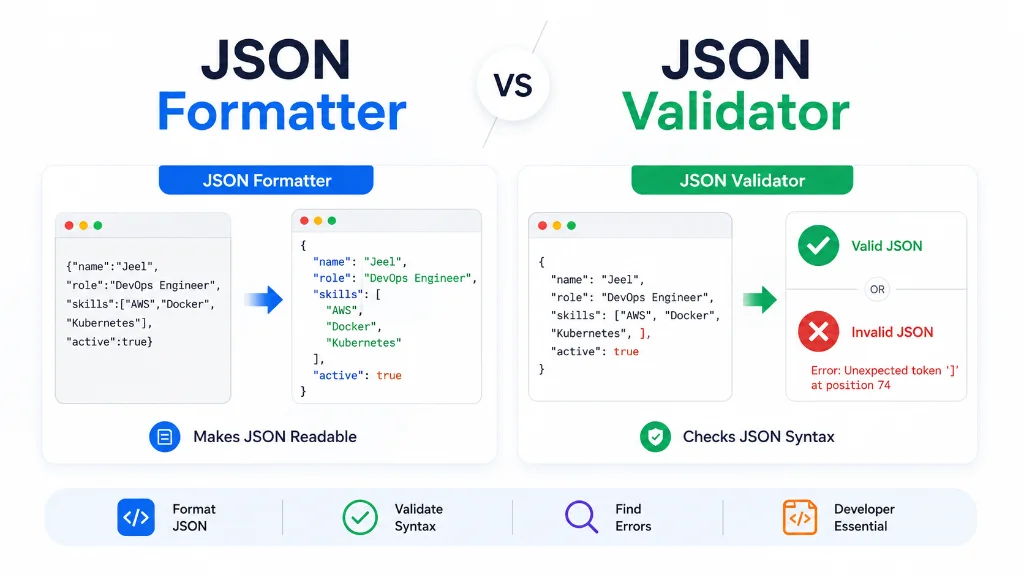
A JSON formatter makes valid JSON easier to read by adding indentation, line breaks, and consistent spacing. A JSON validator checks whether JSON follows the required syntax and identifies errors such as missing commas, incorrect quotation marks, or unclosed brackets. Some modern tools combine both functions.
The simplest way to remember the difference is:
> Formatter = makes JSON readable. Validator = checks whether JSON is valid.
This distinction matters because readable JSON isn't automatically valid JSON, and valid JSON isn't always easy to read.
For example, this JSON may be valid but difficult to inspect:
{"name":"Jeel","role":"DevOps Engineer","skills":["AWS","Docker","Kubernetes"],"active":true}After formatting, the same data becomes much easier to understand:
{
  "name": "Jeel",
  "role": "DevOps Engineer",
  "skills": [
    "AWS",
    "Docker",
    "Kubernetes"
  ],
  "active": true
}
The data hasn't fundamentally changed. The formatting has simply made its structure visible.
What Is a JSON Formatter?
A JSON formatter is a tool that takes JSON text and reorganizes its appearance so humans can read and edit it more easily.
JSON is a text-based data format commonly used to represent structured information. It supports values such as strings, numbers, booleans, null, objects, and arrays.
When JSON is generated by an API or application, it may be compressed into a single line to reduce unnecessary whitespace. That's useful for machines, but inconvenient for humans.
A formatter typically adds:
- Line breaks
- Indentation
- Consistent spacing
- Clear nesting
- Easier-to-scan objects and arrays
Minified JSON vs Formatted JSON
Consider this minified JSON:
{"product":"Laptop","price":799,"available":true,"specs":{"ram":"16GB","storage":"512GB SSD"}}A formatter can turn it into:
{
  "product": "Laptop",
  "price": 799,
  "available": true,
  "specs": {
    "ram": "16GB",
    "storage": "512GB SSD"
  }
}
Both represent the same structure.
The second version is simply much easier for a developer to inspect.
Why Use a JSON Formatter?
A JSON formatter is especially useful when you're:
- Reading an API response
- Debugging application data
- Inspecting nested JSON
- Editing a
.jsonconfiguration file - Copying JSON from a browser or terminal
- Reviewing JSON written by another developer
- Trying to understand unfamiliar data
For example, if an API returns several hundred lines of nested data, manually adding indentation is a waste of time. A JSON formatter can make that structure readable almost instantly.
You can use the TechbyJeel JSON Formatter to format JSON online:
What Is a JSON Validator?
A JSON validator checks whether a JSON document follows the syntax rules defined for JSON.
This is different from formatting.
A validator isn't primarily concerned with whether your JSON looks pretty. Its main question is:
> "Is this actually valid JSON?"
JSON has specific syntax requirements. For example, object property names must be strings, strings use double quotation marks, values must follow the JSON grammar, and objects and arrays cannot contain trailing commas. (MDN Web Docs)
Consider this invalid example:
{
  "name": "Jeel",
  "role": "DevOps Engineer",
  "skills": ["AWS", "Docker", "Kubernetes",]
}
The problem is the comma after "Kubernetes".
JSON does not allow a trailing comma before the closing ].
A validator can identify this syntax problem and help you locate the error.
Common JSON Validation Errors
A JSON validator can help detect problems such as:
1. Missing commas
{
  "name": "Jeel"
  "role": "Developer"
}
There should be a comma after "Jeel".
2. Using single quotes
{
  'name': 'Jeel'
}
Standard JSON requires double quotes for strings and property names.
3. Missing closing brackets
{
  "skills": [
    "AWS",
    "Docker"
}
The array is not properly closed.
4. Trailing commas
{
  "name": "Jeel",
}
The comma before } is invalid JSON.
5. Invalid values
{
  "active": yes
}
JSON uses true, false, or null, not yes.
These rules are part of JSON's formal syntax. The IETF's RFC 8259 defines JSON's grammar and permitted value types, while ECMA-404 also specifies the syntax of valid JSON text.
JSON Formatting and Validation Are Not the Same Thing
This is where many beginners get confused.
Formatting and validation are related, but they perform different jobs.
| Task | JSON Formatter | JSON Validator |
|---|---|---|
| Add indentation | Yes | No |
| Add line breaks | Yes | No |
| Improve readability | Yes | No |
| Check JSON syntax | Sometimes | Yes |
| Find syntax errors | Sometimes | Yes |
| Make minified JSON readable | Yes | No |
| Confirm JSON is valid | Not necessarily | Yes |
| Help debug malformed JSON | Sometimes | Yes |
The important word here is "sometimes."
Some JSON formatter tools first parse the JSON before formatting it. If the JSON cannot be parsed because it contains invalid syntax, the formatter may report an error instead of producing formatted output.
That means a tool can provide both formatting and validation features, but the concepts themselves remain different.
Can a JSON Formatter Also Validate JSON?
Yes, many tools can do both.
When a formatter needs to parse JSON before displaying it, invalid syntax may prevent the formatting operation from completing. In that situation, the tool effectively gives you validation feedback as part of the formatting process.
However, don't assume that every tool labeled "JSON Formatter" provides comprehensive validation.
If your main goal is to determine whether a JSON document is syntactically valid, use a tool that explicitly provides JSON validation.
If your main goal is to make already-valid JSON easier to read, use a formatter.
For many everyday developer tasks, having both capabilities in one tool is the most convenient option.
Why JSON Formatting Matters
Formatting might look like a cosmetic task, but it can save real debugging time.
Imagine receiving this:
{"user":{"id":1042,"name":"Jeel","settings":{"theme":"dark","notifications":{"email":true,"push":false}}}}You can technically read it, but understanding the nesting takes effort.
Formatted JSON makes the hierarchy obvious:
{
  "user": {
    "id": 1042,
    "name": "Jeel",
    "settings": {
      "theme": "dark",
      "notifications": {
        "email": true,
        "push": false
      }
    }
  }
}
This becomes especially useful when debugging APIs.
For example, if you're looking for:
user.settings.notifications.email
the formatted version makes the relationship between each property much easier to follow.
Real-World Uses for a JSON Formatter
Developers commonly use JSON formatting when:
- Inspecting REST API responses
- Debugging frontend and backend communication
- Reading configuration files
- Reviewing pull requests
- Working with webhooks
- Inspecting browser network responses
- Cleaning up copied JSON
- Learning how nested JSON structures work
MDN notes that JSON is widely used for transmitting structured data between applications, including communication between servers and clients. (MDN Web Docs)
That makes JSON readability more than a cosmetic concern. When you're working with real application data, being able to quickly understand its structure can make debugging much easier.
Why JSON Validation Matters
Formatting helps you read JSON. Validation helps you trust its syntax.
This becomes important before JSON is:
- Sent to an API
- Saved as a configuration file
- Processed by an application
- Passed between services
- Used in an automation workflow
- Submitted to a developer tool
A single character can cause a parsing failure.
For example:
{
  "username": "jeel",
  "active": true,
}
The structure looks reasonable at first glance, but the trailing comma makes the JSON invalid.
A validator can catch that before you waste time debugging the application receiving the data.
> Practical rule: If you can't explain whether your JSON is merely hard to read or actually invalid, start by validating it. Once it's valid, format it to make the structure easier to inspect.
JSON Formatter vs JSON Validator: A Practical Example
The easiest way to understand the difference between a JSON formatter and JSON validator is to look at a real example.
Suppose you receive this JSON from an API:
{"name":"Jeel","role":"DevOps Engineer","skills":["AWS","Docker","Kubernetes"],"experience":1.5,"active":true}The JSON is difficult to scan, especially when the structure becomes larger.
A formatter turns it into:
{
  "name": "Jeel",
  "role": "DevOps Engineer",
  "skills": [
    "AWS",
    "Docker",
    "Kubernetes"
  ],
  "experience": 1.5,
  "active": true
}
Now you can immediately see the relationship between the properties and the array.
The formatter changes the presentation, not the underlying data.
A validator has a different job. It checks whether the JSON follows valid JSON syntax.
For example:
{
  "name": "Jeel",
  "role": "DevOps Engineer",
  "skills": ["AWS", "Docker", "Kubernetes",]
}
The trailing comma after "Kubernetes" makes this invalid JSON.
A validator can identify the syntax problem so you can fix it before the JSON is processed by another application.
Common JSON Errors a Validator Can Find
JSON errors are often small, but they can stop an entire request or application from working.
Here are some of the most common problems.
1. Missing Commas
This is invalid:
{
  "name": "Jeel"
  "role": "Developer"
}
There should be a comma after "Jeel".
Correct version:
{
  "name": "Jeel",
  "role": "Developer"
}
2. Single Quotes Instead of Double Quotes
This looks reasonable if you're familiar with JavaScript, but standard JSON requires double quotes around strings.
Invalid:
{
  'name': 'Jeel'
}
Valid:
{
  "name": "Jeel"
}
This distinction is important because JavaScript object syntax and JSON syntax are not identical.
3. Trailing Commas
Invalid JSON:
{
  "name": "Jeel",
  "role": "Developer",
}
The comma immediately before the closing brace is not permitted.
4. Unclosed Brackets or Braces
Invalid:
{
  "name": "Jeel",
  "skills": [
    "AWS",
    "Docker"
}
The array needs its closing ] before the object closes.
5. Invalid Boolean Values
JSON supports:
true
false
null
It does not use values such as:
yes
no
none
So this is invalid:
{
  "active": yes
}
The correct version is:
{
  "active": true
}
These examples demonstrate why a JSON validator can be useful when you're unsure whether a document is syntactically correct.
When Should You Use a JSON Formatter?
Use a JSON formatter when the main problem is readability.
For example, you receive a large API response that looks like this:
{"id":101,"user":{"name":"Jeel","email":"example@example.com","preferences":{"theme":"dark","language":"en"}},"status":"active"}You don't necessarily have a syntax problem. You simply need to understand the structure.
A formatter can make the hierarchy much easier to inspect.
A JSON formatter is useful when you need to:
- Read a large API response
- Understand nested objects
- Inspect arrays
- Edit JSON manually
- Debug application data
- Clean up copied JSON
- Review configuration files
- Make JSON easier for another developer to understand
If readability is your problem, format first.
You can use the TechbyJeel JSON Formatter to quickly format JSON online.
When Should You Use a JSON Validator?
Use a JSON validator when you're asking:
> "Is this JSON actually valid?"
Validation is particularly useful before sending JSON to an API or giving JSON to another application.
For example, imagine you've manually edited a configuration file and suddenly your application reports a parsing error.
Instead of checking every character yourself, paste the JSON into a validator and look for the reported syntax problem.
A JSON validator is useful when you need to:
- Check JSON before an API request
- Find syntax errors
- Debug parsing failures
- Verify copied JSON
- Check configuration files
- Test generated JSON
- Confirm that brackets and quotes are correctly placed
If validity is your problem, validate first.
JSON Formatter vs JSON Validator: Which One Should You Use?
Use a JSON formatter when your JSON is valid but difficult to read. Use a JSON validator when you need to determine whether the JSON follows valid syntax. If you're debugging JSON, a tool that combines formatting and validation can save time.
| Your Problem | Best Choice |
|---|---|
| JSON is one long line | JSON Formatter |
| JSON is difficult to read | JSON Formatter |
| You want better indentation | JSON Formatter |
| JSON causes a parsing error | JSON Validator |
| You don't know if JSON is valid | JSON Validator |
| You suspect a missing comma | JSON Validator |
| You need to inspect API data | JSON Formatter |
| You want to check JSON before an API request | JSON Validator |
| You need readability and error checking | Both |
The good news is that you don't always need two separate tools.
A modern JSON tool can combine formatting and validation so you can paste your data once, identify problems, and then work with a readable version.
How to Format JSON Online
If you are a beginner, you don't need to install complicated software just to make JSON readable.
Follow these steps:
1. Copy your JSON from your API response, application, configuration file, or other source.
2. Open a JSON formatting tool.
3. Paste your JSON into the input area.
4. Format the JSON using the available formatting option.
5. Review any error message if the tool cannot parse your input.
6. Fix invalid syntax if necessary.
7. Format the corrected JSON again.
8. Copy the formatted result for your development work.
For quick formatting, try the free TechbyJeel JSON Formatter.
What If the Formatter Shows an Error?
Don't assume the formatter is broken.
If the tool parses JSON before formatting it, an error usually means the input contains invalid JSON syntax.
Check these areas first:
- Missing commas
- Extra commas
- Incorrect quotation marks
- Missing
] - Missing
} - Invalid values
- Incorrectly escaped characters
Fix the syntax and try again.
This is one reason formatting and validation often appear together in developer tools.
Best Practices for Working With JSON
Whether you're working with APIs, configuration files, or application data, a few simple habits can prevent unnecessary problems.
Validate JSON Before Sending It
If you're manually creating or editing JSON for an API request, validate it before sending the request.
Catching a syntax error locally is much easier than troubleshooting an unexplained API failure.
Format JSON While Debugging
Minified JSON may be efficient for machines, but formatted JSON is usually much easier for humans to debug.
When investigating nested data, indentation lets you see where objects and arrays begin and end.
Don't Confuse JSON With JavaScript Objects
JavaScript can accept syntax that JSON does not.
For example, JavaScript may allow single-quoted strings, while standard JSON requires double-quoted strings.
If you're moving data between systems, always check the actual JSON syntax rather than assuming JavaScript object syntax will work.
Be Careful With Manual Editing
A tiny change can make otherwise correct JSON invalid.
If you're editing a large JSON document manually:
1. Make the change.
2. Validate the JSON.
3. Format it.
4. Review the structure.
5. Use it in your application.
This simple workflow can prevent avoidable debugging sessions.
Use a Formatter for Human Readability
Formatting isn't just about making code look nicer.
Clear indentation helps developers understand:
- Which properties belong to an object
- Which values belong to an array
- How deeply data is nested
- Where a structure starts and ends
That becomes increasingly valuable as JSON documents grow.
JSON Formatter vs JSON Validator: Quick Summary
| Question | Answer |
|---|---|
| What does a JSON formatter do? | Makes JSON easier for humans to read. |
| What does a JSON validator do? | Checks whether JSON follows valid syntax. |
| Does formatting automatically mean JSON is valid? | Not necessarily. |
| Can one tool do both? | Yes, many tools combine formatting and validation. |
| When should I format JSON? | When valid JSON is difficult to read or edit. |
| When should I validate JSON? | When you need to check syntax or troubleshoot parsing errors. |
| What's best for debugging? | Usually both formatting and validation. |
The key takeaway is simple:
> Formatting improves readability. Validation checks correctness.
Once you understand that distinction, choosing the right tool becomes much easier.
Related TechbyJeel Tools
If you're regularly working with developer data, JSON probably isn't the only format you encounter.
You may also find these tools useful:
- JSON Formatter - Format and inspect JSON more easily.
- Developer Tools - Explore additional tools for everyday development workflows.
Use the right tool for the specific problem instead of manually fixing data that a specialized tool can process in seconds.
Frequently Asked Questions
What is the difference between a JSON formatter and JSON validator?
A JSON formatter primarily improves readability by adding indentation, line breaks, and consistent spacing. A JSON validator checks whether the document follows valid JSON syntax. Some tools combine both features, but formatting and validation solve different problems.
Does formatting JSON validate it?
Not always. Some JSON formatters parse the input before formatting it, so they can detect invalid syntax. However, formatting itself is not the same as validation. If you specifically need to confirm that JSON is syntactically valid, use a tool that provides JSON validation.
How do I know if my JSON is valid?
Paste the JSON into a JSON validator or a tool that supports JSON validation. The tool parses the input and reports syntax errors when it cannot interpret the document as valid JSON. Common issues include missing commas, incorrect quotes, trailing commas, and unclosed brackets.
Why is JSON formatting useful?
JSON formatting makes structured data easier to read, understand, and debug. Instead of inspecting a large block of compressed text, developers can see objects, arrays, properties, and nested relationships clearly. This is especially helpful when working with API responses, configuration files, and application data.
Can I format JSON online for free?
Yes. Online JSON formatting tools can format JSON directly in your browser without requiring software installation. You can paste your JSON, format it, inspect the structure, and copy the result. For everyday development tasks, an online formatter is often the quickest option.
Conclusion
The difference between a JSON Formatter vs JSON Validator is straightforward: a formatter focuses on readability, while a validator focuses on syntax. Understanding this distinction helps you choose the right tool instead of wasting time manually inspecting JSON.
When JSON is difficult to read, format it. When you're unsure whether it is valid or you're dealing with a parsing error, validate it. For debugging, having both capabilities available is often the most practical approach.
Ready to work with cleaner JSON? Try the TechbyJeel JSON Formatter and make your JSON easier to read and troubleshoot.