


You have probably seen strings that look nothing like normal text, such as SGVsbG8gV29ybGQ=. At first glance, they may look encrypted or corrupted. In reality, this is simply Base64 encoding.
Base64 is widely used by developers to represent binary data as text. You can find it in email attachments, APIs, JSON data, authentication systems, HTML, CSS, and many other places.
In this beginner's guide to Base64 encoding and decoding, you'll learn what Base64 actually does, how the encoding process works, and where it is useful. You'll also see why Base64 is not encryption, which is one of the most common misunderstandings beginners have.
What Is Base64 Encoding and Decoding?
Base64 encoding converts binary data or text into a text-based representation using 64 characters. Base64 decoding reverses that process and converts the Base64 string back into its original data. It is designed for data representation and transport, not for protecting information with a secret key.
The standard Base64 alphabet contains:
- A-Z - 26 uppercase letters
- a-z - 26 lowercase letters
- 0-9 - 10 numbers
- + and / - 2 additional characters
- = - padding character used when necessary
That gives Base64 its name: 64 possible characters in its main alphabet.
For example:
- Original: Hello World
- Base64: SGVsbG8gV29ybGQ=
Decoding SGVsbG8gV29ybGQ= returns the original text:
Hello WorldThis makes Base64 useful when systems need to move data through environments that are designed primarily for text.
Why Was Base64 Created?
Computers work with binary data - sequences of zeros and ones. Many older communication systems, however, were designed to handle text characters reliably.
Binary data could cause problems when transmitted through systems that expected text.
Base64 provides a simple solution:
> Convert binary data into a limited set of text characters that can be transported more reliably.
This is particularly useful for data transmission and storage formats that have historically been text-oriented.
Base64 became closely associated with Internet standards and email systems. The MIME specification, for example, defines Base64 as one of the content-transfer encodings used for transporting data. RFC 2045 - Multipurpose Internet Mail Extensions
Modern applications still use the same basic idea, even though the surrounding technology has changed dramatically.
How Does Base64 Encoding Work?
The easiest way to understand Base64 encoding is to follow the data transformation step by step.
Suppose we want to encode:
CatThe computer first represents the characters as bytes using an encoding such as UTF-8.
The process then works roughly like this:
1. Convert the input characters into bytes.
2. Represent those bytes as binary.
3. Split the binary data into groups of 6 bits.
4. Convert each 6-bit value into a Base64 character.
5. Add = padding when necessary.
Why 6 Bits?
A byte contains 8 bits.
Base64 uses 6-bit groups because:
2⁶ = 64
That gives exactly 64 possible values, which map to the 64 Base64 characters.
Three 8-bit bytes contain:
3 × 8 = 24 bits
Those 24 bits can be divided into:
4 × 6 = 24 bits
So Base64 typically converts 3 bytes into 4 Base64 characters.
This also explains an important characteristic of Base64: encoded data is generally larger than the original data.
A Simple Base64 Example
Let's look at a familiar example:
Input: Hello
When encoded using Base64, it becomes:
SGVsbG8=
Now decode it:
SGVsbG8= ↓ Hello
Nothing secret happened here.
There was no password, encryption key, or cryptographic protection involved. The data was simply transformed into another representation.
This distinction is important when working with APIs, web applications, authentication systems, and configuration files.
Base64 Encoding vs Encryption
One of the biggest beginner mistakes is thinking Base64 is a security mechanism.
It isn't.
Base64 encoding is reversible by design. Anyone who has the Base64 string can decode it.
For example:
SGVsbG8=
can easily become:
Hello
There is no secret required.
Encryption works differently. Proper encryption uses a cryptographic algorithm and typically a key to transform data so unauthorized users cannot read it.
| Feature | Base64 Encoding | Encryption |
|---|---|---|
| Main purpose | Data representation | Data protection |
| Reversible | Yes | Yes, with appropriate key |
| Secret key required | No | Usually |
| Designed for security | No | Yes |
| Easy to decode | Yes | Depends on algorithm and key |
| Common use | Data transport | Confidential information |
Never use Base64 as a replacement for encryption.
If sensitive information needs confidentiality, use an appropriate security mechanism instead of simply encoding it.
For web security concepts and recommended practices, the OWASP Web Security Testing Guide is a useful reference.
Base64 Encoding vs URL Encoding
Base64 is also sometimes confused with URL encoding.
They solve different problems.
URL encoding is designed to represent characters safely inside URLs. For example, spaces and certain special characters are represented using percent encoding.
Base64, on the other hand, represents binary or textual data using its own character set.
For example:
- URL encoding: Hello World → Hello%20World
- Base64: Hello World → SGVsbG8gV29ybGQ=
The two formats may appear together in some applications, but they should not be treated as interchangeable.
Standard Base64 vs Base64URL
There is also a URL-safe variation called Base64URL.
Standard Base64 uses:
+ /
Base64URL replaces those characters with:
- _
This makes the encoded representation more suitable for URLs and filenames.
Base64URL is commonly encountered in technologies such as JSON Web Tokens (JWTs). The JWT specification defines its use of Base64URL encoding for its compact representation. RFC 7519 - JSON Web Token
Where Is Base64 Used?
You don't need to be an advanced developer to encounter Base64. It appears in many everyday web technologies.
1. Email Attachments
Email systems can use Base64 to represent binary attachments as text during transmission.
This is one of the classic applications of Base64 and is part of the broader MIME ecosystem. RFC 2045 - MIME
2. Images in HTML and CSS
Small images can sometimes be embedded directly into HTML or CSS using a Base64 data URL.
For example:
<img src="data:image/png;base64,...">Instead of referencing a separate image file, the image data itself is included in the document.
This can be useful for small assets, although it is not automatically the best choice for every website.
3. APIs
Some APIs use Base64 to transport binary information inside JSON or other text-based formats.
For example:
{ "filename": "document.pdf", "content": "JVBERi0xLjQK..." }The long value may represent the PDF file encoded as Base64.
4. Authentication
Base64 is also encountered in HTTP authentication mechanisms.
For example, the Basic Authentication format represents credentials using Base64. However, Base64 itself does not provide encryption, so Basic Authentication should be used with HTTPS to protect credentials during transmission. MDN - Authorization HTTP Header
5. Developer Tools and Debugging
Developers frequently encounter Base64 while inspecting:
- API requests
- JSON responses
- JWTs
- Configuration files
- Logs
- Web pages
- Authentication headers
- Encoded files
Having a Base64 encoder and decoder available can make troubleshooting much faster.
Try Base64 Encoding and Decoding Online
If you only need to convert a string occasionally, you don't need to write code.
You can use TechbyJeel Tools' Base64 Tools to quickly encode or decode Base64 data directly in your browser.
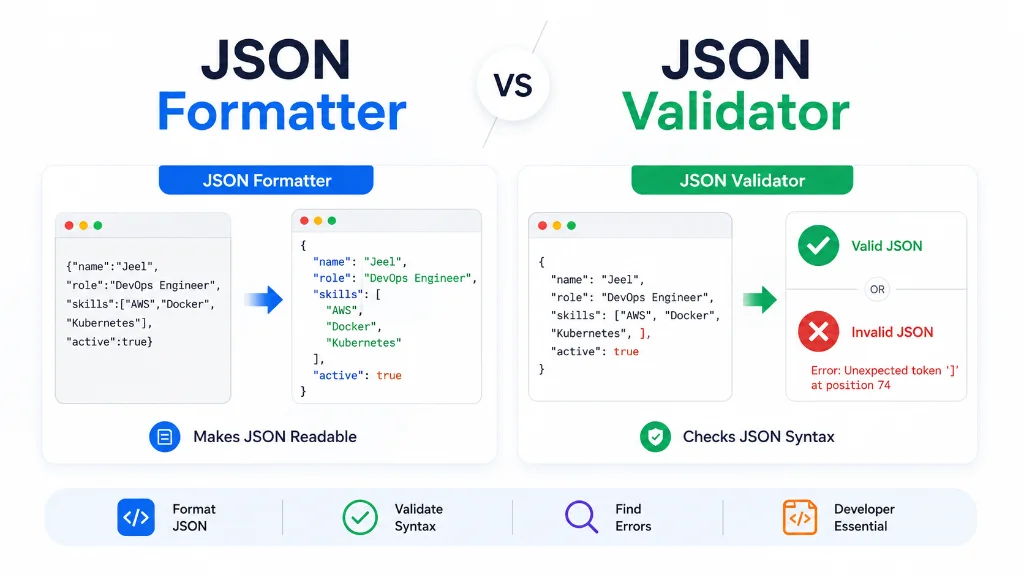
For related tasks, you can also use the JSON Formatter to make JSON easier to inspect, or explore other Developer Tools on TechbyJeel Tools.
Tip: Never paste passwords, API keys, private tokens, or other sensitive information into an online tool unless you understand exactly how the tool handles your data.
Is Base64 Compression?
No.
Base64 is not a compression method.
In fact, Base64 normally increases the size of the data because three bytes become four Base64 characters.
A useful rule of thumb is:
> Base64 encoding adds roughly 33% overhead to raw binary data before considering other formatting or transport overhead.
So if your goal is to reduce a file's size, Base64 is the wrong tool.
For images and other large files, a compression tool is more appropriate. You can try the Image Compressor when reducing image file sizes.
Quick Base64 Cheat Sheet
| Question | Answer |
|---|---|
| What is Base64? | A method for representing binary data as text |
| Is Base64 encryption? | No |
| Can Base64 be decoded? | Yes |
| Does Base64 require a key? | No |
| Does Base64 reduce file size? | No |
| Does Base64 increase size? | Usually, yes |
| Can Base64 represent images? | Yes |
| Is Base64URL the same as standard Base64? | Similar, but uses URL-safe characters |
| Is Base64 useful in APIs? | Yes |
| Can beginners use Base64 tools? | Yes |
What You Should Remember
Base64 looks complicated when you first see a long encoded string, but the underlying idea is straightforward: it converts data into a text-friendly representation using a 64-character alphabet.
The most important distinction is that Base64 is encoding, not encryption. It is designed to make data easier to represent and transport, not to hide information from other people.
In Part 2, we'll go further into Base64 decoding, practical encoding and decoding methods, common errors, Base64 in JavaScript and other developer workflows, security considerations, and the situations where you should or should not use Base64.
Continue to Part 2: How to Encode and Decode Base64 + Practical Examples, Common Errors, and Best Practices
Beginner's Guide to Base64 Encoding and Decoding - Part 2
Part 1 explained what Base64 is, how the encoding process works, and why Base64 should never be confused with encryption. Now let's move from theory to practice.
In this part, you'll learn how to encode and decode Base64, how developers use it in JavaScript and web applications, how to recognize common errors, and when Base64 is actually a good choice.
How to Encode and Decode Base64
Base64 encoding converts text or binary data into a Base64 string, while Base64 decoding converts that string back into its original representation. You can perform both operations with an online Base64 tool, programming language functions, command-line utilities, or browser APIs.
For simple conversions, an online Base64 encoder or decoder is usually the fastest option. Developers can also use built-in functions such as JavaScript's btoa() and atob() for suitable data.
Method 1: Use an Online Base64 Tool
If you don't need to write code, an online tool is the simplest approach.
To encode text
1. Open a Base64 encoder.
2. Enter or paste your text.
3. Choose the Encode option.
4. Copy the resulting Base64 string.
5. Use the encoded value where needed.
For example:
- Original: TechbyJeel
The resulting Base64 value is:
VGVjaGJ5SmVlbA==
To decode Base64
The process works in reverse:
1. Open a Base64 decoder.
2. Paste the Base64 string.
3. Choose Decode.
4. Review the decoded result.
5. Copy the original text if needed.
- Base64: VGVjaGJ5SmVlbA==
- Decoded: TechbyJeel
For occasional conversions, this is much faster than opening a development environment and writing a script.
You can use the TechbyJeel Base64 Tools to handle these conversions directly in your browser.
Method 2: Base64 in JavaScript
JavaScript provides two commonly known functions for working with Base64:
btoa()- converts binary-string data to Base64atob()- decodes Base64 back into binary-string data
A basic example looks like this:
const encoded = btoa("Hello World");
console.log(encoded); // SGVsbG8gV29ybGQ=
To decode it:
const decoded = atob("SGVsbG8gV29ybGQ=");
console.log(decoded); // Hello World
These functions are built into web browsers and are documented by MDN. MDN - Window btoa() MDN - Window atob()
An important JavaScript limitation
There is one detail beginners often miss.
btoa() and atob() work with binary strings and are not designed to directly handle every Unicode character.
For example, this can cause problems:
btoa("こんにちは");For Unicode text, you need to convert the text into bytes using an appropriate encoding approach, such as TextEncoder, before performing the Base64 conversion.
This matters when working with:
- Hindi text
- Japanese text
- Emojis
- Arabic text
- Chinese text
- Other non-ASCII characters
For modern web applications, always consider the character encoding of the data instead of assuming every string is plain ASCII.
Base64 in URLs and Web Applications
Base64 is frequently encountered when developers inspect URLs, API requests, browser storage, authentication systems, or web application data.
However, standard Base64 is not always appropriate inside URLs because it can contain characters such as:
+ / =
These characters can have special meanings depending on where they appear.
That's where Base64URL becomes useful.
Base64URL uses URL-safe alternatives:
+→-/→_
Padding may also be handled differently depending on the application or specification.
This format is especially important when working with technologies such as JSON Web Tokens. The JWT specification defines a compact representation using Base64URL encoding for its components. RFC 7519 - JSON Web Token
Base64 in Data URLs
One interesting web use case is embedding data directly inside a URL.
For example:
<img src="data:image/png;base64,iVBORw0KGgo...">The browser receives the image data directly as part of the src value.
This can be useful for small assets, icons, or specific self-contained documents.
However, embedding large files as Base64 can make HTML or CSS significantly larger and harder to maintain.
For a normal website, don't automatically Base64-encode every image just because you can.
Use it when there is a clear reason.
Common Base64 Errors
Base64 is simple once you understand it, but several mistakes appear regularly.
1. Treating Base64 as encryption
This is the biggest mistake.
If someone can decode your Base64 string without a secret key, the data was never protected by Base64.
- Bad approach: Password → Base64 → "Security"
- Correct understanding: Password → Base64 → Representation
Base64 does not provide confidentiality.
2. Using the wrong Base64 variant
Standard Base64 and Base64URL are similar but not identical.
If an application expects Base64URL and you provide standard Base64, characters such as + and / can create compatibility problems.
Always check the format expected by the application or specification you're working with.
3. Corrupted Base64 strings
A Base64 string can become invalid if characters are accidentally removed or changed.
For example, copying a value from an email, document, terminal, or web page can sometimes introduce unwanted characters or line breaks.
If decoding fails, check:
- Whether the entire string was copied
- Whether characters were modified
- Whether whitespace was introduced
- Whether the expected Base64 variant is correct
- Whether padding is required
- Whether the input is actually Base64
4. Incorrect character encoding
Text is not just text inside a computer.
Characters are represented using an encoding such as UTF-8. If one application encodes text differently from another, decoding may produce unexpected results.
This is especially important for international languages and emoji.
5. Confusing encoded data with compressed data
Base64 doesn't make data smaller.
If a Base64 string looks shorter or longer than expected, remember that encoding and compression are completely different operations.
How to Check Whether a String Is Base64
There is no universal way to prove that an arbitrary string is Base64 simply by looking at it.
A string may contain only characters from the Base64 alphabet and still be ordinary text.
For example:
HelloWorld
uses characters that are valid in the Base64 alphabet, but that doesn't automatically mean it is a meaningful Base64-encoded value.
A proper decoder should validate the structure and attempt to decode the input.
This is why a Base64 decoder or validator can be more useful than manually inspecting a string.
Base64 and File Data
Base64 can represent more than ordinary text.
It can encode the bytes of:
- Images
- PDFs
- Audio files
- Video files
- Documents
- ZIP files
- Other binary data
For example, a PDF encoded as Base64 may begin with something resembling:
JVBERi0xLjQK
The beginning of the decoded file contains the PDF file signature.
This technique is useful when an API needs to transport a file inside a text-based payload such as JSON.
For example:
{ "filename": "report.pdf", "content": "JVBERi0xLjQK..." }The receiving application can decode the Base64 value back into the original bytes and reconstruct the file.
Should You Use Base64 for Large Files?
Usually, no.
Base64 adds overhead, which means a binary file generally becomes larger after encoding.
Imagine an application needs to transfer a large video file. Encoding the entire video as Base64 and placing it inside JSON can create unnecessary overhead.
For large files, dedicated binary transfer mechanisms are often more appropriate.
Base64 makes more sense when:
- The data must fit into a text-only format.
- An API specifically expects Base64.
- A small asset needs to be embedded directly.
- A protocol or specification requires it.
- You need a convenient textual representation of binary data.
The correct choice depends on the system you're building.
Base64 Security: What You Need to Know
Base64 itself is not dangerous, but misunderstanding it can create security problems.
Never assume the following is secure:
> Sensitive Data ↓ Base64 ↓ "Protected Data"
It isn't.
If someone obtains the Base64 string, they can decode it.
For sensitive information, use appropriate security mechanisms such as encryption, authentication, authorization, and HTTPS depending on the situation.
For web applications, the MDN Web Security documentation provides useful guidance on broader security concepts.
Also be careful when using online Base64 tools with confidential information.
Do not paste private keys, passwords, access tokens, customer information, or other sensitive data into an online service unless you trust its privacy and data-handling practices.
Base64 Best Practices
If you're using Base64 in a project, follow these simple rules.
1. Know why you're encoding
Don't add Base64 just because you see another developer using it.
Ask:
> Does this system actually require text-safe binary representation?
If the answer is no, Base64 may not be necessary.
2. Don't use Base64 for security
If the goal is confidentiality, use encryption.
Base64 is encoding, not protection.
3. Use the correct variant
Use standard Base64 when the specification expects standard Base64.
Use Base64URL when working with systems that require URL-safe encoding.
4. Consider the size overhead
Base64 increases the size of binary data.
This matters for:
- API payloads
- Database storage
- Network requests
- HTML files
- CSS files
- JSON responses
5. Handle character encoding correctly
For text containing Unicode characters, make sure both the encoding and decoding sides agree on how the bytes represent the text.
6. Validate external input
If your application receives Base64 from users or external systems, don't blindly trust it.
Validate the input and handle decoding errors properly.
Base64 vs Other Common Encodings
Here's a quick comparison:
| Format | Main Purpose | Reversible | Typical Use |
|---|---|---|---|
| Base64 | Represent binary data as text | Yes | APIs, email, embedded data |
| Base64URL | URL-safe Base64 representation | Yes | JWTs, URLs |
| URL Encoding | Safely represent URL characters | Yes | Query parameters, URLs |
| Hexadecimal | Represent bytes using hex characters | Yes | Debugging, hashes, binary data |
| ASCII | Character encoding standard | Depends on context | Basic text representation |
| UTF-8 | Encode Unicode text into bytes | Yes | Modern text on the web |
The important lesson is that these formats are designed for different problems.
Choosing the right one depends on what your application needs to accomplish.
A Practical Base64 Workflow
When you encounter an unfamiliar Base64 value, use this simple workflow:
1. Identify where it came from.
- API?
- JWT?
- HTML?
- Email?
- Configuration file?
2. Determine what format is expected.
- Standard Base64?
- Base64URL?
- Another encoding?
3. Decode a copy of the value.
4. Inspect the result.
- Plain text?
- JSON?
- Image bytes?
- PDF?
- Something else?
5. Check the application's documentation.
Never assume the decoded value is safe to execute or trust.
This last point is important when working with data received from unknown sources.
Quick Base64 Example
Here's the complete process in one place:
- Step 1: Original text: Hello TechbyJeel
- Step 2: Encode: SGVsbG8gVGVjaGJ5SmVlbA==
- Step 3: Transmit or store the encoded value
- Step 4: Decode: Hello TechbyJeel
The data has changed representation, but its underlying information has not been encrypted.
Frequently Asked Questions
What is Base64 encoding used for?
Base64 encoding is used to represent binary or textual data using a text-friendly character set. Common examples include email attachments, API payloads, embedded images, authentication headers, configuration data, and JSON-based systems that need to transport binary content.
Is Base64 encoding secure?
No. Base64 is not an encryption method and does not provide confidentiality. Anyone who has a Base64-encoded value can generally decode it. Sensitive information should be protected using appropriate encryption and secure communication methods rather than relying on Base64 encoding.
How do I decode a Base64 string?
You can decode a Base64 string using an online Base64 decoder, a programming language function, or a command-line utility. Paste the encoded value into the decoder and run the decode operation. If decoding fails, verify that the value is complete and that you're using the correct Base64 variant.
Why does Base64 make files larger?
Base64 represents every group of three bytes using four Base64 characters. This means encoded data normally requires about one-third more space than the original binary data, before additional formatting or transport overhead. Base64 is therefore not a compression technique.
What is the difference between Base64 and Base64URL?
Base64URL is a URL-safe variation of Base64. Standard Base64 uses + and /, while Base64URL replaces them with - and _. Base64URL is commonly used where encoded data needs to be safely included in URLs or similar contexts, including JWTs.
Final Takeaway
Base64 encoding and decoding is simply a way to represent data in a text-friendly format. It is useful for APIs, email, embedded data, authentication mechanisms, and systems that need to transport binary information through text-based formats.
The most important rule to remember is simple: Base64 is not encryption. It can make data easier to transmit or store, but it does not make that data secret.
If you need to encode or decode a value quickly, try the TechbyJeel Base64 Tools and explore the other free developer utilities available on TechbyJeel Tools.
Related Tools
If you're working with encoded or structured data, these TechbyJeel Tools can also help:
- JSON Formatter - Format and inspect JSON data.
- Developer Tools - Explore additional tools for common development tasks.
- Character Counter - Check the length of text and encoded strings.