


SendShort - AI-Powered Short-Form Video Creation
Turn long videos into short-form content with AI-powered cropping, dynamic captions, contextual B-roll, background music, and social scheduling.
What Is SendShort?
Product overview & core problem solved
SendShort is an AI-powered video repurposing platform designed to help creators, podcasters, video editors, and businesses turn long-form videos into short-form content without handling every editing step manually.
Instead of spending hours in traditional video editing software selecting timestamps, cropping wide 16:9 footage, manually typing subtitles, and placing B-roll, SendShort automates the repetitive parts of the editing process. Using AI face reference tracking, the tool keeps speakers framed properly in a 9:16 vertical layout while generating animated captions and matching background elements.
Whether you publish to YouTube Shorts, TikTok, or Instagram Reels, SendShort provides an accessible all-in-one environment that turns single video assets into multiple social-ready clips.
SendShort Application Screenshots
Explore the authentic SendShort interface across dashboard management, caption editing, vertical video framing, AI faceless creation, and chapter clipping.
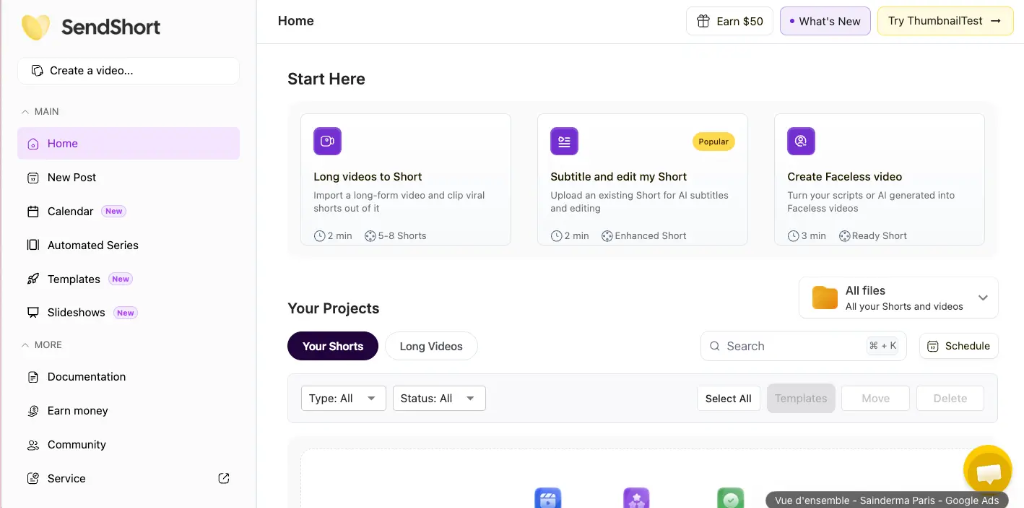
1. Dashboard Home Screen
Workspace OverviewSendShort central workspace showing project management, quick-start tools (Long videos to Short, Subtitle & edit my Short, Create Faceless video), and active video projects.
Why TechbyJeel Recommends SendShort
Practical advantages for digital creators & video workflows
Turn longer videos into short-form content without manually starting each edit from scratch.
Automate or simplify repetitive tasks such as vertical cropping, speaker centering, and caption creation.
Add dynamic captions, contextual B-roll, background music, and sound effects from one interface.
Schedule and manage completed social content directly from the same platform.
Versatile tool suited for YouTubers, podcasters, content creators, agencies, marketers, and businesses repurposing video.
SendShort Core Features
Explore the AI-powered capabilities designed to streamline short-form video production.
Long Video Cropping
Select moments from long videos and turn them into vertical short-form videos. SendShort uses AI and faces as a reference to help create properly framed vertical videos.
9:16 Vertical Formatting
Converts content into the 9:16 vertical format commonly required for TikTok, YouTube Shorts, and Instagram Reels.
Dynamic AI Captions
Generates dynamic subtitles designed for short-form content. Captions can be customized for font styles, highlights, and positioning.
Custom Caption Templates
Create and save your own custom caption templates to maintain consistent brand styling across all your video shorts.
Contextual B-Roll
Adds contextual B-roll footage to video clips automatically, making spoken content significantly more visually engaging.
Background Music
Allows users to seamlessly add background music tracks to enhance video mood and audio pacing.
Sound Effects
Inserts sound effects at key speech moments and transitions to emphasize important highlights in the video.
Social Media Scheduling
Allows users to schedule short video content directly from the platform to maintain a consistent publishing calendar.
Social Media Management
Manage social media content, posts, and messaging from one centralized workspace.
Performance Analysis
Analyze short video performance and track content engagement analytics right inside SendShort.
Who Is SendShort For?
SendShort is built for specific creator and business workflows where repurposing video yields high value.
Repurpose long YouTube videos into vertical short-form clips to drive new channel subscribers.
Turn long audio or video podcast conversations into engaging short social clips with subtitles.
Create more short-form content consistently without manually editing every single clip.
Reduce repetitive editing work like initial clipping, subtitle creation, and 9:16 re-framing.
Scale short-form video production for client marketing campaigns without expanding editing overhead.
Repurpose existing webinars, product demos, and internal recordings for social media marketing.
How SendShort Works
A simple 5-step workflow designed to transform long video into ready-to-publish short clips.
Start With a Long Video
Upload your long-form video or provide video link content.
Find Short Content
Use AI-powered functionality to identify key highlights and moments.
Convert to Vertical
Create a properly framed 9:16 vertical version with face reference tracking.
Customize
Add dynamic captions, B-roll, background music, and sound effects.
Publish or Schedule
Use built-in social features to schedule and manage published clips.
Key Practical Benefits
What you gain by integrating SendShort into your content creation stack:
Pros and Things to Consider
An honest overview of SendShort's advantages and realistic operational considerations.
Advantages (Pros)
- AI-assisted short-form video creation workflow
- Long-video-to-short video repurposing process
- Automatic 9:16 vertical formatting with AI face reference
- Customizable animated captions & custom caption templates
- Contextual B-roll support, background music, and sound effects
- Integrated social scheduling and performance analytics
- Designed for YouTubers, podcasters, creators, and agencies
Things to Consider
- AI-generated results should still be reviewed before publishing to ensure speech accuracy.
- Output visual quality depends partly on the resolution of the original source video.
- Users requiring advanced frame-by-frame professional editing may still prefer a traditional video editor.
- SendShort's features, pricing, and availability may change over time as the platform updates.
When Should You Use SendShort?
SendShort is worth considering if you regularly create short-form content from longer videos and want to reduce repetitive editing work.
Recommended Use Cases:
Turn Your Long Videos Into Shorts
If you regularly repurpose long-form videos, SendShort can simplify the workflow with AI-powered cropping, captions, B-roll, music, and social scheduling.
Frequently Asked Questions
Clear answers to common queries regarding SendShort's functionality.